How to convert Word to PDF
- Select or drop a DOCX file.
- Read any warnings about content that could not be converted exactly.
- Preview the PDF, then download it and compare it with the original.
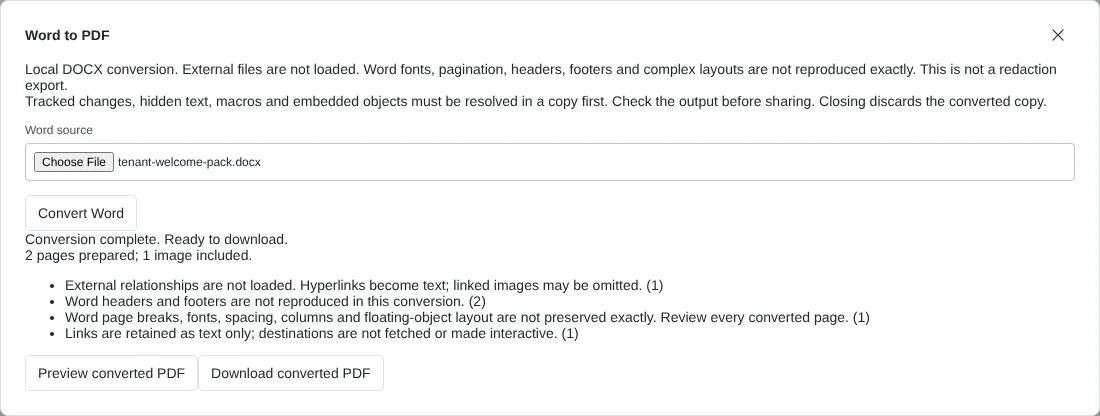
Worked example: converting a two-page tenant welcome pack
In this test we converted a fictional Word document: a tenant welcome pack from Northfield Lettings, saved as a 41,547-byte DOCX. It had a title, four headings, a bulleted list, a five-row contacts table, a PNG floor plan, a web link, a page header, a page footer and several paragraphs about bin collections.
The tool reported 2 pages prepared and 1 image included, with four warnings: external links are not loaded, Word headers and footers are not reproduced, Word layout is not preserved exactly, and links are kept as text only. The downloaded PDF was 40,311 bytes on A4 portrait pages. Its text was selectable and used embedded Liberation Sans fonts. The table kept all five rows and three columns with ruled borders, and the floor plan was embedded at its original 900 by 560 pixels.
Three things needed fixing or accepting. The link text was present but not clickable, as the PDF contained no link annotations. The header and footer text did not appear anywhere in the PDF. The Floor plan heading sat at the bottom of page 1 with its picture on page 2. These are the kinds of differences to look for when you check your own file.
What the PDF keeps from your Word document, and what it drops
The converter reads the content of the DOCX rather than printing it the way Word does. Text, the Title style and Heading 1 to 5, bold and italic, bulleted and numbered lists, simple tables and PNG or JPEG pictures come across. Text stays selectable and searchable in the PDF.
Other parts are left out or changed. Headers, footers and any page numbers inside them are not reproduced. Comments are not included. Links become plain text. Text boxes are moved into the main flow, so they lose their position. Word fields are not recalculated. Pictures in other formats are replaced by a placeholder. Every page is A4 portrait with the converter's own margins and fonts, so a Letter-size document or one with wide margins will break across pages differently from Word.
Why a Word file is refused, and how to fix it
Some documents are stopped before conversion so that nothing unexpected ends up in the PDF. This happens if the file contains tracked changes, hidden text, macros, ActiveX controls or embedded objects such as an inserted spreadsheet. Work on a copy: accept or reject all changes, remove hidden text, save as a plain DOCX without macros, and replace embedded objects with pictures. Then convert the copy.
The DOCX must be 25 MiB or smaller, and each conversion has a 90-second limit. If a long report times out, split it into sections in Word, convert each one, then join the PDFs with Merge PDF. Older DOC files need to be saved as DOCX first.
Adding page numbers and links back after conversion
Because headers and footers are dropped, the PDF has no page numbers unless they were in the body text. Open the converted PDF and use Add page numbers to put them back, or Bates numbering for legal references. If working links, exact pagination or your own fonts matter, use Save as PDF in Word for the final copy and use this tool for quick, private drafts.
Good to know
- Works with DOCX. Save older DOC files as DOCX in Word first.
- This is not Microsoft Word, so fonts, floating images and page breaks can differ. Check long tables and text near page edges.
- For a final version that must match Word exactly, use Save as PDF in Word itself.
Why your files stay on your device
RedactNinja PDF runs in your web browser. When you choose a file, it is read and processed on your own computer, tablet or phone. It is not uploaded to a server, so there is nothing for us to store, read or delete afterwards.
You can check this yourself: open your browser's developer tools, select the Network tab and use a tool. Your document does not appear in the requests. The editor also loads no advertising or analytics code. How to check that nothing is uploaded.
Free, with no sign-up and no watermark
Every tool is free to use without an account. Nothing is added to your documents, and there are no daily task limits. Large files depend on your device's memory, so very big scans may take longer on older machines.
Questions about Word to PDF
Is there a watermark on the PDF?
No. Nothing is added to your document.
Can I convert several Word files at once?
Convert them one at a time, then use Merge PDF to combine the results if you need a single file.
Does it keep hyperlinks and headings?
Headings and basic text formatting are converted. Hyperlinks become plain text, headers and footers are left out, and only PNG and JPEG pictures are included; other picture types show a placeholder.
Are my files uploaded?
No. The tool runs in your browser and processes the file on your device. Nothing is sent to a server.
Is it free?
Yes. There is no account, no watermark and no daily limit.
Further reading
Related tools
All PDF tools
Organise
- Merge PDF
- Split PDF
- Organise PDF
- Rotate PDF
- Delete PDF pages
- Extract PDF pages
- Crop PDF
- Resize PDF pages
- Batch PDF
Convert from PDF
- PDF to Word
- PDF to Excel
- PDF to PowerPoint
- PDF to JPG
- PDF to PNG
- PDF to text
- PDF to Markdown
- Extract images
- PDF to PDF/A
Convert to PDF
Edit and sign
- Edit PDF
- Edit PDF text
- Find and replace in PDF
- PDF comments list
- Fill PDF form
- Sign PDF
- Draw on PDF
- Watermark PDF
- Add page numbers
- Bates numbering