How to convert Excel to PDF
- Select or drop an XLSX workbook and inspect it.
- Choose the worksheets, paper size, orientation and how many columns fit across each page. Decide whether to include hidden rows and columns.
- Preview the PDF and download it.
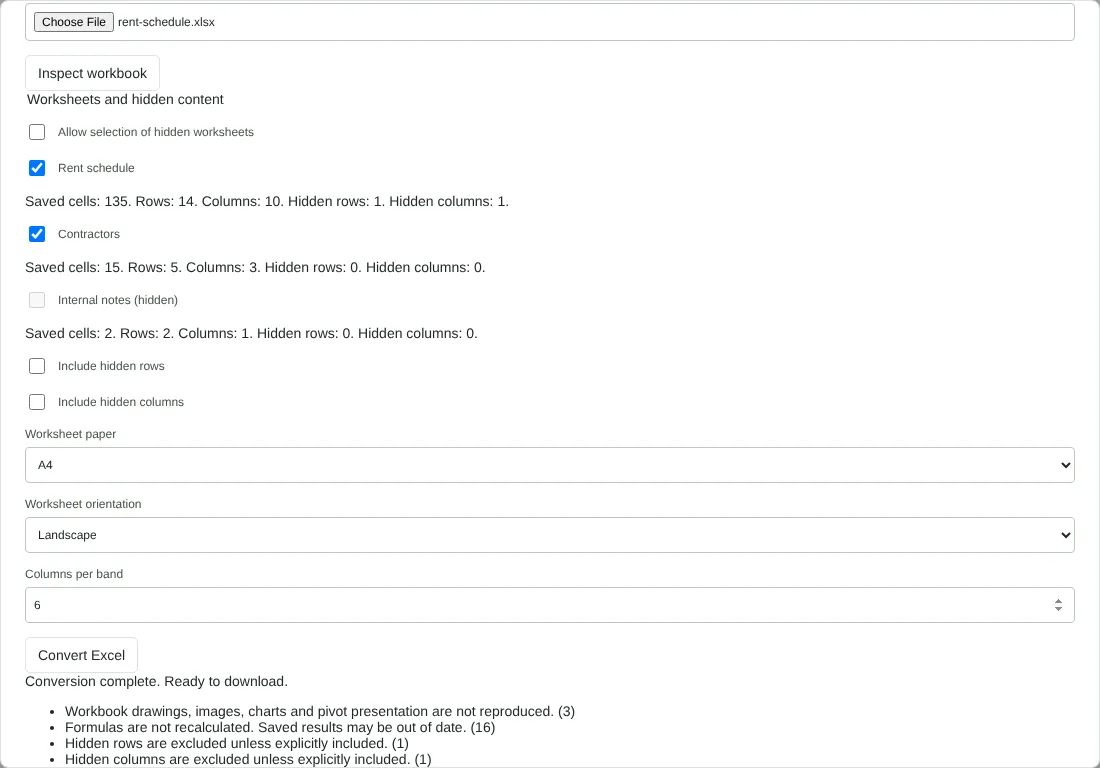
Worked example: a rent schedule with hidden data
In this test we converted a fictional 12,564-byte workbook from Northfield Lettings with three worksheets. Rent schedule has 14 rows and 10 columns, formulas for arrears and totals, a bar chart, a hidden column of phone numbers and one hidden row. Contractors is a small 5-row list. Internal notes is a hidden worksheet.
Inspect workbook listed all three sheets with their saved cells, rows, columns and hidden rows and columns. The hidden worksheet was unticked and could not be selected unless we allowed hidden worksheets. We kept the defaults: A4, landscape and 6 columns per band.
The PDF had 3 pages and was 31,714 bytes. Rent schedule took 2 pages, with 113 cells included and 22 excluded: columns A, B, D, E, F and G on the first band, then H, I and J. Contractors took 1 page. The phone numbers, the hidden row and the hidden sheet did not appear in the PDF text, and the chart was not reproduced. Formula results showed as saved, with pound signs and day/month/year dates kept. Setting 12 columns per band cut the PDF to 2 pages; setting 3 raised it to 4.
How columns per band decide the number of pages
Rather than shrinking a wide sheet to fit, the tool splits its columns into bands. With 6 columns per band, columns A to F (skipping any hidden ones) are printed for every row first, then the next six columns start on a new page. Each page shows the sheet name, a line such as Column band 1 of 2 with the column letters, and the original Excel row numbers down the left, so you can match a row across bands.
To get fewer pages, raise Columns per band, up to 12. To get wider, easier-to-read cells, lower it. Landscape gives more width than portrait, and you can choose A4 or Letter. Empty rows are left out. If a long cell runs on to the next page, its row number is marked with an asterisk.
What does not carry over from Excel to the PDF
The PDF is a plain, readable table, not a copy of your Excel print layout. Fonts, fill colours, borders, conditional formatting, charts, pictures, comments, print areas, page breaks and Excel headers and footers are not reproduced. Merged cells are simplified, and links show as their cell text.
Formulas are not recalculated. The PDF shows the result Excel saved in the file. If a formula has no saved result, which can happen with workbooks created by scripts or other software, the cell shows [Formula result unavailable]. Opening the file in Excel and saving it again normally stores the results. Number formats are kept where they are supported, but check currency, dates and rounding.
Workbooks that will not convert
Macro-enabled workbooks and files with ActiveX controls or embedded objects are refused. Save a standard XLSX copy without them. A workbook can have up to 100 worksheets, and a sheet up to 20,000 rows and 256 columns, with no more than 150,000 cells in total. Conversion stops after 90 seconds, so select fewer worksheets or split a very large workbook. To turn a PDF table back into a spreadsheet, use PDF to Excel.
Good to know
- Wide sheets are split into bands of columns so nothing is squeezed too small.
- Hidden worksheets, rows and columns are left out unless you choose to include them.
- The PDF shows cell values. Charts, images, comments and cell formatting from Excel are not reproduced.
Why your files stay on your device
RedactNinja PDF runs in your web browser. When you choose a file, it is read and processed on your own computer, tablet or phone. It is not uploaded to a server, so there is nothing for us to store, read or delete afterwards.
You can check this yourself: open your browser's developer tools, select the Network tab and use a tool. Your document does not appear in the requests. The editor also loads no advertising or analytics code. How to check that nothing is uploaded.
Free, with no sign-up and no watermark
Every tool is free to use without an account. Nothing is added to your documents, and there are no daily task limits. Large files depend on your device's memory, so very big scans may take longer on older machines.
Questions about Excel to PDF
Does it support XLS or CSV?
XLSX only. Save older XLS files or CSV data as XLSX first.
Can I fit a sheet on one page?
Increase the columns per band and use landscape orientation: more columns per band means fewer pages. Very wide sheets will still span several pages.
Will formulas show?
The PDF shows the calculated values stored in the workbook.
Are my files uploaded?
No. The tool runs in your browser and processes the file on your device. Nothing is sent to a server.
Is it free?
Yes. There is no account, no watermark and no daily limit.
Related tools
All PDF tools
Organise
- Merge PDF
- Split PDF
- Organise PDF
- Rotate PDF
- Delete PDF pages
- Extract PDF pages
- Crop PDF
- Resize PDF pages
- Batch PDF
Convert from PDF
- PDF to Word
- PDF to Excel
- PDF to PowerPoint
- PDF to JPG
- PDF to PNG
- PDF to text
- PDF to Markdown
- Extract images
- PDF to PDF/A
Convert to PDF
Edit and sign
- Edit PDF
- Edit PDF text
- Find and replace in PDF
- PDF comments list
- Fill PDF form
- Sign PDF
- Draw on PDF
- Watermark PDF
- Add page numbers
- Bates numbering