How to convert PDF to Word
- Select or drop the PDF.
- Keep Reconstruct paragraphs and basic formatting on for letters and reports. Turn on aligned table reconstruction only for pages that are a single table grid; a page that mixes text and a table comes out as text.
- Download the Word document and check text order, headings and numbers. Select several PDFs at once to get one Word file for each, downloaded together as a ZIP.
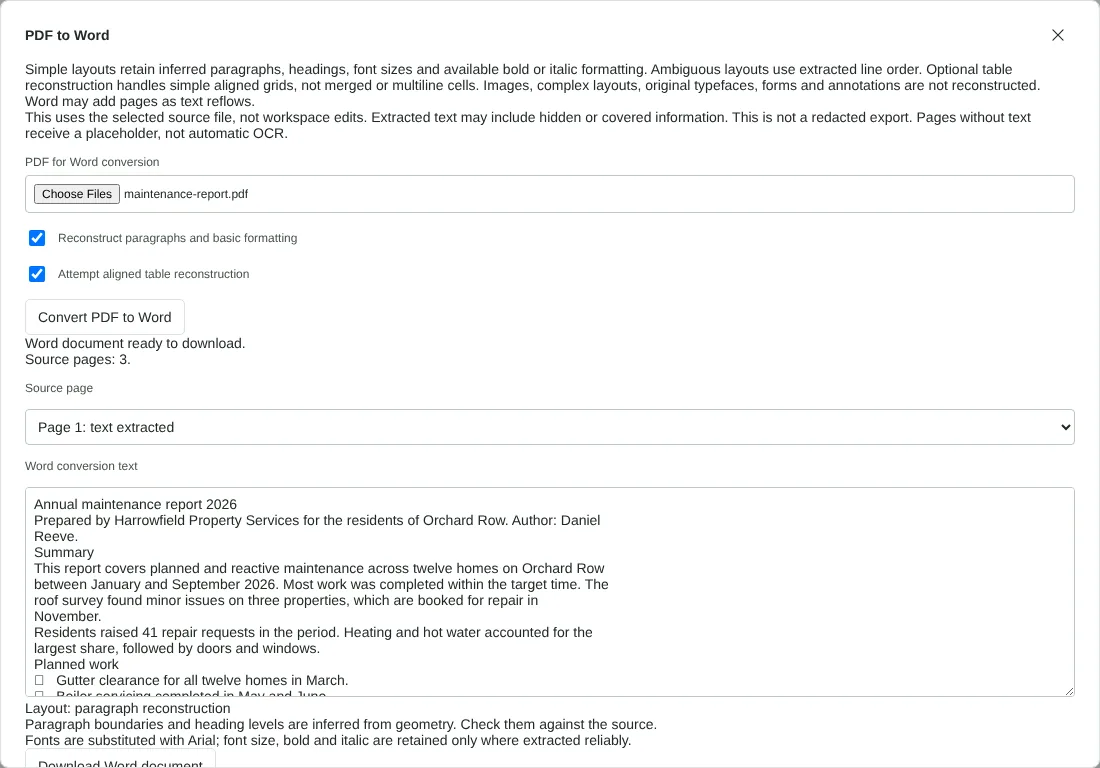
Worked example: a three-page maintenance report
In this test we used a fictional three-page A4 PDF of 55,589 bytes: an annual maintenance report for Orchard Row, exported from a word processor. Page 1 has a title, three section headings, short paragraphs, three bullet points and a floor plan picture. Page 2 is running text. Page 3 holds only a table of 9 rows and 4 columns.
With both options on, the dialog reported paragraph reconstruction for pages 1 and 2 and an aligned table for page 3. The Word file was 9,870 bytes. The title became Heading 1 and the three section headings became Heading 2, so they appear in Word's navigation pane. Wrapped lines were joined back into whole paragraphs, giving 15 paragraphs plus one Word table of 9 rows by 4 columns. All text was set in Arial.
Two things were lost. The floor plan picture was not included, as the DOCX contained no images. The bullets came through as a symbol character that showed as an empty box in Arial, not as a Word list. With table reconstruction off, page 3 became nine lines of text with the columns separated by spaces.
How headings, lists and tables come across in Word
Headings are recognised by size. A line at least a quarter larger than the main body text becomes Heading 1 or Heading 2. A heading that is only bold, at the same size as the body, stays an ordinary paragraph. Bold and italic are kept where the PDF reports them reliably.
Lists keep their bullet or number as typed characters. They are not turned into Word list formatting, so indents and numbering will not update if you add items.
Table reconstruction only works when a whole page is one simple grid: at least three rows, between 2 and 12 columns, and the same number of cells on every row. A page that mixes paragraphs with a table, or has merged or multi-line cells, is converted as text. Pages laid out in columns, such as newsletters, keep the extracted line order instead, and the dialog says so for that page.
Each PDF page starts on a new page in Word. The Word pages are A4 with 2 cm margins, so long pages may run on to an extra page as the text reflows.
Checking the Word file before you edit it
Use the Source page list in the dialog to look at each page. The Layout line tells you whether paragraphs were rebuilt, a table was found or the original line order was used. Pages marked as having no extractable text get a placeholder in Word.
In the Word file, check the reading order, numbers, dates and names against the PDF. Replace any bullet characters that show as boxes with a proper Word list. Pictures are not carried over: if you need them, save them with the Extract images tool and insert them in Word.
The Word file is built from all the text in the PDF, including text that is hidden or covered on the page. If the PDF contains anything that must not reach the person receiving the Word file, redact it first with Redact PDF, download the redacted copy and convert that file.
Good to know
- A PDF stores fixed pages, not paragraphs, so the Word layout is rebuilt rather than copied. Expect differences in fonts and spacing.
- Scanned pages contain no text. Run OCR PDF first, then convert.
- Pictures in the PDF are not carried into the Word file.
- Hidden or covered text in the PDF can appear in the Word file. Conversion is not redaction.
Why your files stay on your device
RedactNinja PDF runs in your web browser. When you choose a file, it is read and processed on your own computer, tablet or phone. It is not uploaded to a server, so there is nothing for us to store, read or delete afterwards.
You can check this yourself: open your browser's developer tools, select the Network tab and use a tool. Your document does not appear in the requests. The editor also loads no advertising or analytics code. How to check that nothing is uploaded.
Free, with no sign-up and no watermark
Every tool is free to use without an account. Nothing is added to your documents, and there are no daily task limits. Large files depend on your device's memory, so very big scans may take longer on older machines.
Questions about PDF to Word
Will the Word document look exactly like the PDF?
Not always. Simple letters and reports convert well; multi-column layouts, forms and complex tables need checking and tidying.
Can I convert a scanned PDF to Word?
Yes, after recognising the text with OCR PDF. Check the recognised text for errors.
Do I need Microsoft Word installed?
No. The DOCX is created in your browser and opens in Word, LibreOffice or Google Docs.
Can I convert several PDFs to Word at once?
Yes. Select or drop up to 50 PDFs. Each is converted with the same settings and you get a ZIP of Word documents, with a list of any files that could not be converted.
Are my files uploaded?
No. The tool runs in your browser and processes the file on your device. Nothing is sent to a server.
Is it free?
Yes. There is no account, no watermark and no daily limit.
Further reading
- PDF to Word in Microsoft 365 compared with a browser tool
- Troubleshoot PDF conversion and export problems
Related tools
All PDF tools
Organise
- Merge PDF
- Split PDF
- Organise PDF
- Rotate PDF
- Delete PDF pages
- Extract PDF pages
- Crop PDF
- Resize PDF pages
- Batch PDF
Convert from PDF
- PDF to Word
- PDF to Excel
- PDF to PowerPoint
- PDF to JPG
- PDF to PNG
- PDF to text
- PDF to Markdown
- Extract images
- PDF to PDF/A
Convert to PDF
Edit and sign
- Edit PDF
- Edit PDF text
- Find and replace in PDF
- PDF comments list
- Fill PDF form
- Sign PDF
- Draw on PDF
- Watermark PDF
- Add page numbers
- Bates numbering