How to add Bates numbers to a PDF
- Select or drop the PDF, or merge several documents into one bundle first.
- In the export settings, turn on Add Bates numbers and set the prefix, suffix, starting number, minimum digits and position.
- Export and check the numbering on the first and last pages.
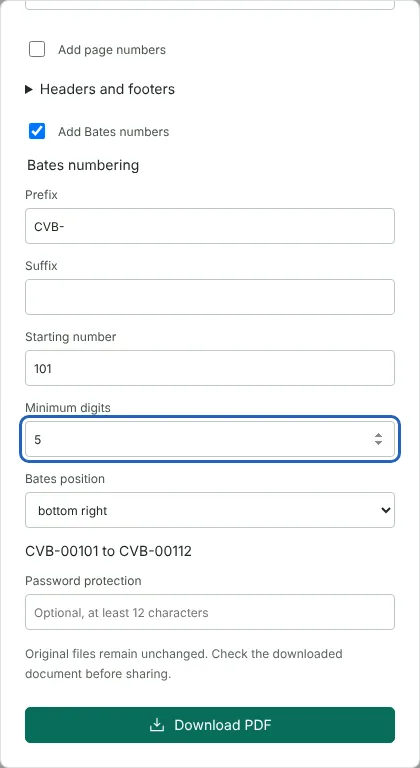
Worked example: Bates numbers for a 12-page disclosure bundle
In this test we used a fictional 12-page disclosure bundle for the claim Amelia Carter v Noah Bennett, 12,912 bytes in size. It contains six documents, and the rent schedule on page 8 is a landscape page. Opening the file from this page started the export settings with Add Bates numbers ticked and six minimum digits, which previewed as 000001 to 000012.
We set the prefix to CVB-, the starting number to 101 and the minimum digits to 5, and kept the position at bottom right. The preview changed to CVB-00101 to CVB-00112 before we downloaded anything.
The downloaded PDF had 12 pages and was 13,114 bytes. Page 1 carried CVB-00101, page 7 carried CVB-00107 and page 12 carried CVB-00112. On the landscape page the label sat in the bottom right corner of the page as it is read. The labels are stored as text, and a text extraction tool read every one, so you can search the bundle for a Bates number.
How a Bates label is built
Each label is the prefix, then the number padded with leading zeros to the minimum number of digits, then the suffix. With the prefix NFL-, the suffix -C, a starting number of 7 and 4 digits, the first label is NFL-0007-C. The prefix and suffix can each be up to 40 characters on one line, and the minimum digits can be from 1 to 12. The digit count is a minimum, so the number grows when it needs to: after 99999 comes 100000.
The label is printed in 10 point dark grey text, 24 points in from the corner you choose: top left, top right, bottom left or bottom right. The preview under the settings shows the first and last label for the pages you are exporting, which is a quick check before you download.
Continuing a Bates sequence across several bundles
Bates numbers count the pages you export, starting from the starting number. If you enter a page range at the top of the export settings, only those pages are numbered, in the order they are exported. To continue from an earlier bundle that ended at CVB-00112, set the starting number to 113 and keep the same prefix, suffix and digits.
To reuse the same settings, save them with Download export preset and load the preset next time. A preset keeps the Bates prefix, suffix, starting number, digits and position as readable text, but not your document, page range or password.
Batch PDF cannot apply Bates numbers. Combine the documents with Merge PDF first, then number the merged bundle in one export.
Using Bates numbers with page numbers, headers and footers
Simple page numbers always sit at the bottom left, so Bates numbers cannot use that corner when Add page numbers is ticked. A header or footer must be on the opposite edge from the Bates label: with Bates numbers at the bottom, add a header rather than a footer. The export settings show a message and keep the download button disabled until the conflict is fixed.
If a label is too long for a narrow page, the export stops and names the page; shorten the prefix or suffix, or make the page larger with Resize PDF pages. Bates labels are added on top of the page and do not hide anything, so they are no substitute for Redact PDF. If a bundle needs redaction, redact first and number the final copy.
Good to know
- Numbers continue across every page in the exported document.
- Use a starting number to continue a sequence from an earlier bundle.
- Page numbers and Bates numbers can be combined if they use different positions.
Why your files stay on your device
RedactNinja PDF runs in your web browser. When you choose a file, it is read and processed on your own computer, tablet or phone. It is not uploaded to a server, so there is nothing for us to store, read or delete afterwards.
You can check this yourself: open your browser's developer tools, select the Network tab and use a tool. Your document does not appear in the requests. The editor also loads no advertising or analytics code. How to check that nothing is uploaded.
Free, with no sign-up and no watermark
Every tool is free to use without an account. Nothing is added to your documents, and there are no daily task limits. Large files depend on your device's memory, so very big scans may take longer on older machines.
Questions about Bates numbering
What is Bates numbering?
A system of unique, sequential page identifiers used in legal and regulatory document sets.
Can I continue numbering from a previous set?
Yes. Set the starting number to the next number in the sequence.
Can I Bates-number several files?
Merge them first so the sequence runs across the whole set.
Are my files uploaded?
No. The tool runs in your browser and processes the file on your device. Nothing is sent to a server.
Is it free?
Yes. There is no account, no watermark and no daily limit.
Related tools
All PDF tools
Organise
- Merge PDF
- Split PDF
- Organise PDF
- Rotate PDF
- Delete PDF pages
- Extract PDF pages
- Crop PDF
- Resize PDF pages
- Batch PDF
Convert from PDF
- PDF to Word
- PDF to Excel
- PDF to PowerPoint
- PDF to JPG
- PDF to PNG
- PDF to text
- PDF to Markdown
- Extract images
- PDF to PDF/A
Convert to PDF
Edit and sign
- Edit PDF
- Edit PDF text
- Find and replace in PDF
- PDF comments list
- Fill PDF form
- Sign PDF
- Draw on PDF
- Watermark PDF
- Add page numbers
- Bates numbering