How to find and replace text in a PDF
- Select or drop the PDF.
- Type the text to find and what to replace it with. Turn on Match case or Whole words only if you need to.
- Select Find, untick any matches you want to keep, then select Replace and export the PDF.
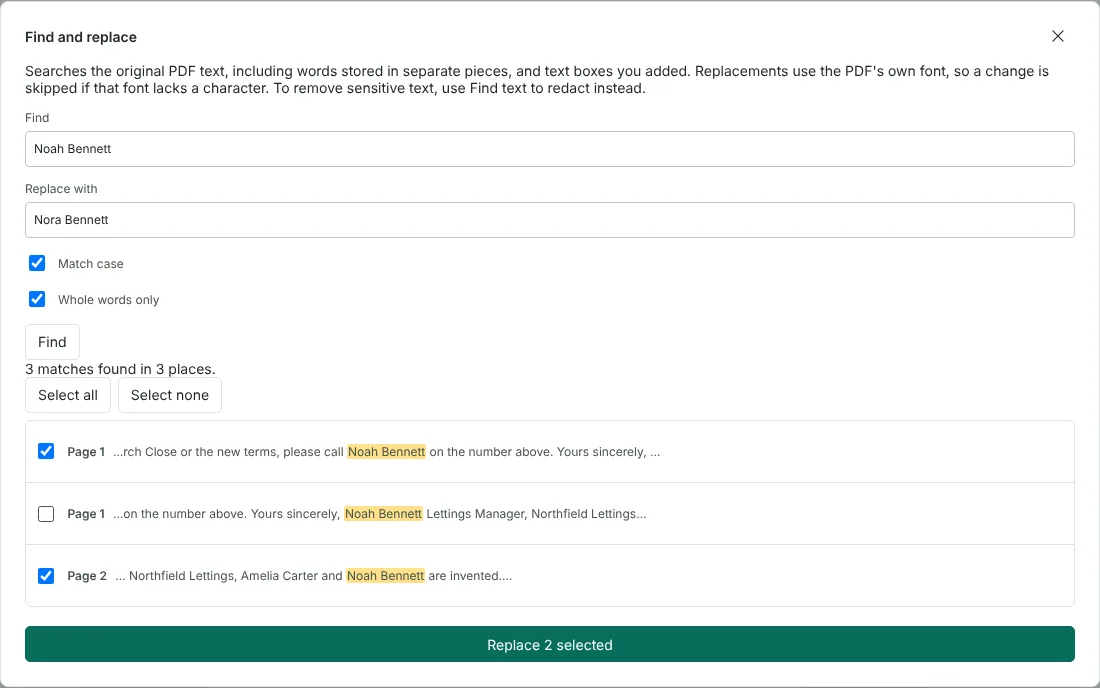
Worked example: changing a contact name in a two-page letter
In this test we used a fictional tenancy renewal letter from Northfield Lettings (2 pages, 32,816 bytes), exported from a word processor with embedded subset fonts. The contact for questions was changing from Noah Bennett to Nora Bennett, but Noah's signature block had to stay as it was.
With Match case and Whole words only ticked, Find listed 3 matches in 3 places: the request to call Noah Bennett on page 1, the signature block on page 1 and a note on page 2. Each line in the list shows the words around the match, which made the signature block easy to spot. We unticked it and selected Replace 2 selected.
The tool reported 2 matches replaced and nothing skipped. Comparing the extracted text of the exported PDF (43,437 bytes) with the original showed exactly two changed lines, and the signature block still read Noah Bennett.
Check every replacement before you export
Replacements reuse the font embedded in the PDF, and documents often embed only the letters they use. Before replacing a match, the tool checks that the font can draw every new letter. In a separate test on the same letter, replacing Mill Street with Mill Quay was skipped with the reason that the font cannot show "Q", because that letter had never been embedded. Zoom in on each changed line in the exported file to check its spacing.
After replacing, zoom in on each changed line in the editor and select Undo if anything looks wrong. Replacement words built from letters that already appear in the document are the most reliable. In our example, every letter in Nora already appeared elsewhere in the letter.
How Match case and Whole words only work
Without Match case, a search for larch also finds Larch and LARCH. Whole words only stops a search for Ann from matching Annex or Joanne; letters, digits and underscores in any script count as part of a word.
The search covers every page of every PDF open in the editor, plus text boxes you added, and page numbers in the list follow the current page order. If you change the search words or options after a search, the tool asks you to select Find again before it will replace anything, so the list always matches what will change.
When to use another tool instead of find and replace
Use Edit PDF text to rewrite a single line when the change is more than a word swap. Use Redact PDF to remove personal details. On a scanned page, OCR adds an invisible text layer behind the picture, so replacing that text would not change the words you can see. Add new text with Edit PDF instead.
Good to know
- The replacement uses the font already in the PDF. A match is skipped and listed, with the letters concerned, when that font cannot draw the new text.
- Text you added in the editor is searched too.
- Words the PDF stores as separate pieces are found and replaced too, and the text after them is moved along to fit. Scanned pages have no visible text to replace.
- Undo reverses the whole replacement in one step.
Why your files stay on your device
RedactNinja PDF runs in your web browser. When you choose a file, it is read and processed on your own computer, tablet or phone. It is not uploaded to a server, so there is nothing for us to store, read or delete afterwards.
You can check this yourself: open your browser's developer tools, select the Network tab and use a tool. Your document does not appear in the requests. The editor also loads no advertising or analytics code. How to check that nothing is uploaded.
Free, with no sign-up and no watermark
Every tool is free to use without an account. Nothing is added to your documents, and there are no daily task limits. Large files depend on your device's memory, so very big scans may take longer on older machines.
Questions about Find and replace in PDF
Can I replace a word throughout a PDF?
Yes. Every match is listed with its page number. Replace them all, or untick the ones to leave alone.
Why was a match skipped?
PDFs often include only the letters they use from each font. When the replacement needs a letter that is not there, the match is skipped and the missing letters are named, so nothing shows as an empty box. Choose wording that uses letters already in the document, or add new text with Edit PDF.
Can I use this to remove sensitive text?
No. To remove text so it cannot be recovered, use Redact PDF. Replacing text is for corrections.
Does it work on signed PDFs or forms?
No. Changing a signed PDF breaks its signature, and PDFs with form fields are blocked to protect the form.
Are my files uploaded?
No. The tool runs in your browser and processes the file on your device. Nothing is sent to a server.
Is it free?
Yes. There is no account, no watermark and no daily limit.
Related tools
All PDF tools
Organise
- Merge PDF
- Split PDF
- Organise PDF
- Rotate PDF
- Delete PDF pages
- Extract PDF pages
- Crop PDF
- Resize PDF pages
- Batch PDF
Convert from PDF
- PDF to Word
- PDF to Excel
- PDF to PowerPoint
- PDF to JPG
- PDF to PNG
- PDF to text
- PDF to Markdown
- Extract images
- PDF to PDF/A
Convert to PDF
Edit and sign
- Edit PDF
- Edit PDF text
- Find and replace in PDF
- PDF comments list
- Fill PDF form
- Sign PDF
- Draw on PDF
- Watermark PDF
- Add page numbers
- Bates numbering