How to convert PDF to Markdown
- Select or drop the PDF.
- Choose whether to attempt simple Markdown tables.
- Review the extracted text and download the Markdown file.
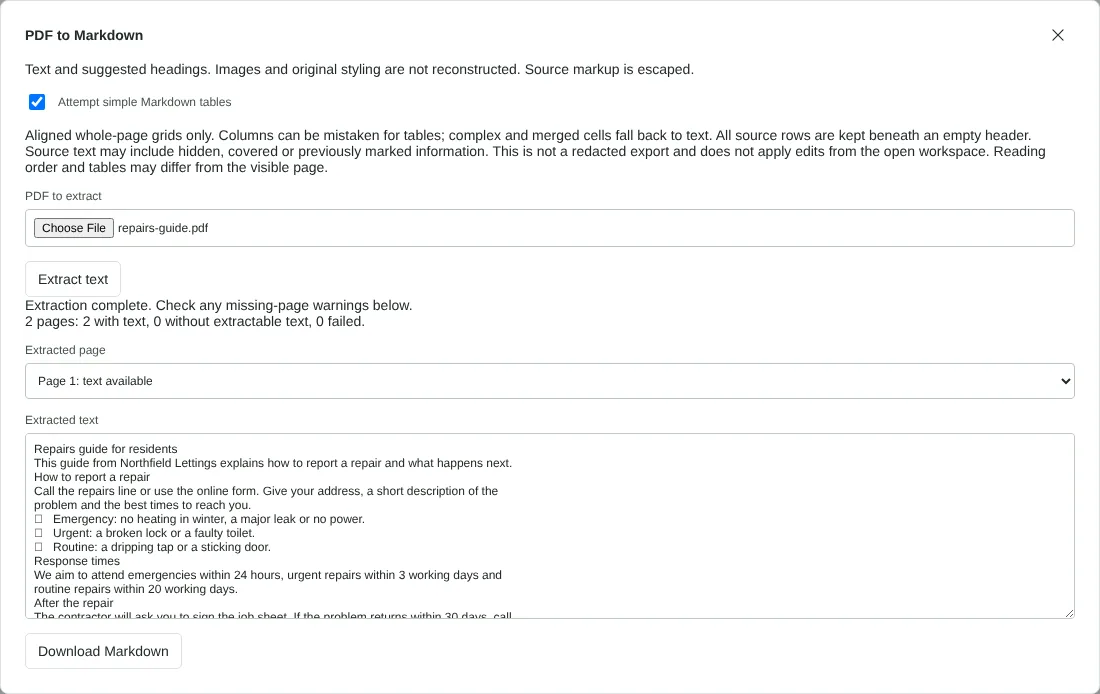
Worked example: a two-page repairs guide
In this test we used a fictional two-page A4 PDF of 38,683 bytes: a repairs guide for residents, exported from a word processor. Page 1 has a 26 pt title, three section headings set at 13 to 14 pt over 11 pt body text, short paragraphs and three bullet points. Page 2 holds only a table of 6 rows and 3 columns.
With Attempt simple Markdown tables ticked, the dialog reported 2 pages with text. The Markdown file was 1,230 bytes. The title became a level 1 heading, but the three section headings came out as ordinary lines because they were not much larger than the body text. Each line of the PDF became its own paragraph, so sentences that wrapped were split in two. The bullets came through as a symbol character rather than Markdown list items, and every full stop had a backslash in front of it in the raw file.
The table on page 2 became a Markdown table of 6 rows under an empty header row. With the table option off, the file was 1,114 bytes and each table row was a plain line such as Emergency 24 hours Major leak.
What the Markdown file contains
The download is a .md file. It starts with a comment noting that it is extracted text, and each page begins with a comment such as <!-- Page 1 -->. These comments do not show when the Markdown is displayed, but they help you find your place in the source.
Characters that mean something in Markdown, such as full stops, hyphens, asterisks, brackets and hash signs, are escaped with a backslash. The text then displays exactly as in the PDF, but the raw file looks busier, for example next\. at the end of a sentence. Text that looks like HTML or a link is never turned into one.
Headings are chosen by size. A line at least 1.8 times the size of the typical body text becomes a level 1 heading, and one at least 1.35 times becomes level 2. Bold headings at body size stay as plain lines. A page with no text gets a line saying it may need OCR.
Tidying the Markdown before you use it
Expect to spend a few minutes in your editor. Join lines that were split at the PDF line ends, add # or ## to headings that were missed, and replace bullet symbols with a hyphen and a space so they become a list. If a table was found, move its first row into the empty header row.
Text is kept in the order it is stored in the PDF rather than re-sorted by position on the page, which avoids mixing two columns line by line. In many PDFs that keeps each column together, but check the order in newsletters, forms and pages with sidebars.
Tables are only attempted when a whole page is one simple grid. A page that mixes paragraphs and a table comes out as text, and two-column layouts can sometimes be mistaken for a table, so check the result. For tables you need to work with, PDF to Excel gives you more control over columns. If you want plain text without any Markdown escaping, use PDF to text instead.
Good to know
- Works with PDFs that have selectable text. Run OCR PDF first on scans.
- Headings are detected from text size and can be missed, and lists are not turned into Markdown lists. Tidy both in your editor.
- Images are not included in the Markdown.
Why your files stay on your device
RedactNinja PDF runs in your web browser. When you choose a file, it is read and processed on your own computer, tablet or phone. It is not uploaded to a server, so there is nothing for us to store, read or delete afterwards.
You can check this yourself: open your browser's developer tools, select the Network tab and use a tool. Your document does not appear in the requests. The editor also loads no advertising or analytics code. How to check that nothing is uploaded.
Free, with no sign-up and no watermark
Every tool is free to use without an account. Nothing is added to your documents, and there are no daily task limits. Large files depend on your device's memory, so very big scans may take longer on older machines.
Questions about PDF to Markdown
What is Markdown?
A plain text format with simple symbols for headings, lists and links, used by GitHub, Obsidian, Notion and many wikis.
Are tables converted?
Simple tables can be attempted. Complex tables are better handled with PDF to Excel.
Is my document sent to an AI service?
No. Extraction runs entirely in your browser.
Are my files uploaded?
No. The tool runs in your browser and processes the file on your device. Nothing is sent to a server.
Is it free?
Yes. There is no account, no watermark and no daily limit.
Related tools
All PDF tools
Organise
- Merge PDF
- Split PDF
- Organise PDF
- Rotate PDF
- Delete PDF pages
- Extract PDF pages
- Crop PDF
- Resize PDF pages
- Batch PDF
Convert from PDF
- PDF to Word
- PDF to Excel
- PDF to PowerPoint
- PDF to JPG
- PDF to PNG
- PDF to text
- PDF to Markdown
- Extract images
- PDF to PDF/A
Convert to PDF
Edit and sign
- Edit PDF
- Edit PDF text
- Find and replace in PDF
- PDF comments list
- Fill PDF form
- Sign PDF
- Draw on PDF
- Watermark PDF
- Add page numbers
- Bates numbering