How to extract text from a PDF
- Select or drop the PDF.
- Review the extracted text for each page.
- Select and copy text from the page view, or download the text file.
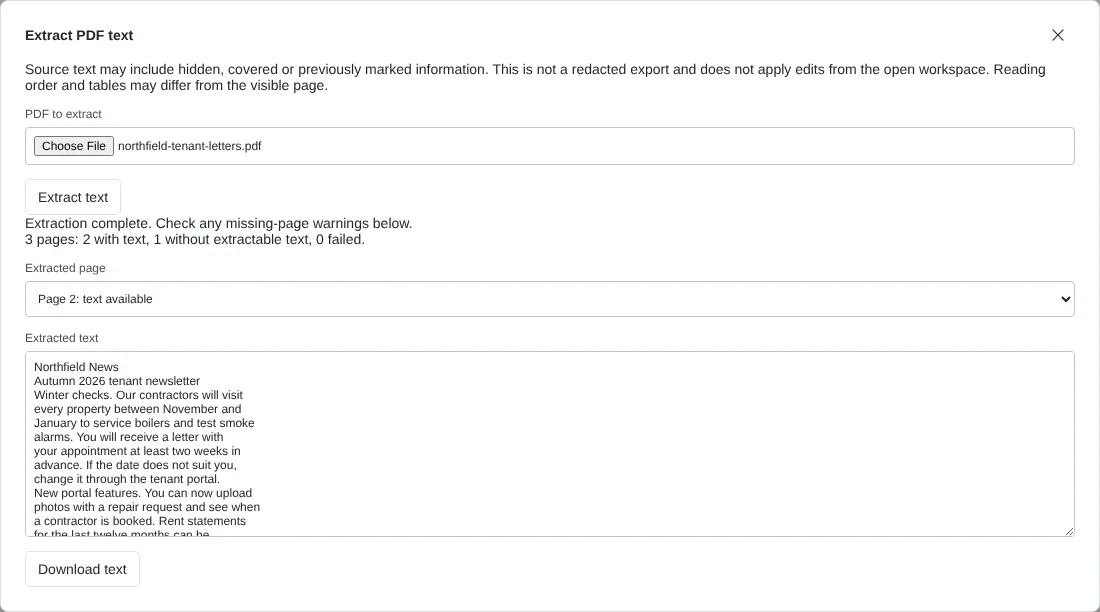
Worked example: a letter, a newsletter and a scanned page
In this test we used a fictional 3-page PDF from a letting agent: a tenancy renewal letter, a two-column tenant newsletter, and a third page that is a scanned image of a meter readings form.
The result summary read 3 pages: 2 with text, 1 without extractable text, 0 failed. The download, extracted-text.txt, was 1,268 bytes of plain text. Each page starts with a line such as Page 1, and the scanned page appeared as a note saying it may need OCR or may be blank, rather than being skipped without warning. The letter kept its line breaks as they appear on the page. In the newsletter, the whole left column came before the right column, because that is the order the text is stored in this PDF; other files may mix columns line by line.
We then tried a password-protected PDF. It was refused with the message that the PDF needs a password and that you should open an authorised unprotected copy. If you are entitled to the content, remove the password first with Unlock PDF.
When text extraction works and when you need OCR
Text extraction reads the characters stored in the PDF. That usually works for PDFs saved from Word, Excel or a web browser. It does not work on scanned pages or photos of documents, where the text is part of a picture. The summary and the page list show which pages had no extractable text; if those pages are scans, run OCR PDF on the file and extract the text again.
Some PDFs carry a permission setting that forbids copying text. The tool respects it and stops with a message rather than working around it, so ask the sender for a copy that allows copying. Each file can be up to 100 MiB and 500 pages, with up to five million characters of text; split larger documents first with Split PDF.
Plain text, Markdown or Word: choosing the output
PDF to text gives you characters and line breaks only, with no bold, headings, columns or tables. That suits pasting into an email, a search tool, a spreadsheet cell or a script, and checking what a PDF really contains. Lines end where they end on the page, so a paragraph may arrive as several short lines; join them in your editor if you need flowing text.
If you want headings and lists you can reuse in a wiki or notes app, PDF to Markdown gives the same text with suggested Markdown structure. For an editable document that keeps the layout, use PDF to Word, and for tables of figures, PDF to Excel.
Use text extraction to check what a PDF contains
Extraction returns every piece of text in the file, including words covered by a shape, set in white, or left under a black box drawn by someone who meant to redact them. That makes it a quick check before you share a document: if a name or account number you thought was removed appears in the TXT file, the PDF has not been redacted properly. Use Redact PDF to remove it, then extract the text again to check.
The tool reads the file you choose, not the document open in the editor, so changes you have made in the workspace are not included. Export the edited PDF first if you need its text.
Good to know
- Only PDFs with real text can be extracted. If you cannot select text in the PDF, run OCR PDF first.
- Reading order follows the page layout, so columns and tables may need tidying.
- Hidden or covered text can be extracted. Check before sharing.
Why your files stay on your device
RedactNinja PDF runs in your web browser. When you choose a file, it is read and processed on your own computer, tablet or phone. It is not uploaded to a server, so there is nothing for us to store, read or delete afterwards.
You can check this yourself: open your browser's developer tools, select the Network tab and use a tool. Your document does not appear in the requests. The editor also loads no advertising or analytics code. How to check that nothing is uploaded.
Free, with no sign-up and no watermark
Every tool is free to use without an account. Nothing is added to your documents, and there are no daily task limits. Large files depend on your device's memory, so very big scans may take longer on older machines.
Questions about PDF to text
Why is the extracted text empty?
The page is probably a scanned image. Use OCR PDF to recognise the text first.
Can I keep the formatting?
For formatting, use PDF to Word. Text extraction gives plain text.
Does it work on password-protected PDFs?
No. Use an unprotected copy you are authorised to use, or remove the password with Unlock PDF if you know it.
Are my files uploaded?
No. The tool runs in your browser and processes the file on your device. Nothing is sent to a server.
Is it free?
Yes. There is no account, no watermark and no daily limit.
Related tools
All PDF tools
Organise
- Merge PDF
- Split PDF
- Organise PDF
- Rotate PDF
- Delete PDF pages
- Extract PDF pages
- Crop PDF
- Resize PDF pages
- Batch PDF
Convert from PDF
- PDF to Word
- PDF to Excel
- PDF to PowerPoint
- PDF to JPG
- PDF to PNG
- PDF to text
- PDF to Markdown
- Extract images
- PDF to PDF/A
Convert to PDF
Edit and sign
- Edit PDF
- Edit PDF text
- Find and replace in PDF
- PDF comments list
- Fill PDF form
- Sign PDF
- Draw on PDF
- Watermark PDF
- Add page numbers
- Bates numbering