How to OCR a PDF: make a scanned PDF searchable
- Select or drop the scanned PDF.
- Recognition starts on page 1 in English. For another language, or a second one, cancel, choose the OCR languages in the side panel and run recognition on the page, a region or the whole document.
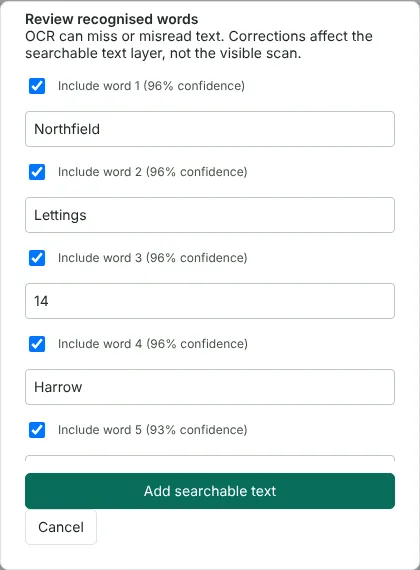
- Review the recognised words, add the searchable text layer and export.
Worked example: OCR on a scanned one-page letter
In this test we used a fictional one-page letter from Northfield Lettings about a gas safety check. It was a 200 dpi greyscale scan saved as a PDF of 223,691 bytes, slightly tilted and speckled like a real scan. Before OCR, no text could be extracted from it.
We selected the file on this page. Recognition started on page 1 in English, and the review list opened after about 10 seconds. It listed 84 words with confidence scores between 90% and 97%. Every word matched the letter, including the postcode NF4 7QX and the date 14 October 2026. We chose Add searchable text and exported the PDF.
The exported file was 241,386 bytes. It held the same 1654 x 2338 pixel scan, and a render of the page showed no pixel differences from the original. All 84 words could now be extracted, searched and copied. A cleaner or rougher scan will give different results.
OCR one page, part of a page or the whole document
When you open a file from this page, recognition starts straight away on the first page in English. For another language, cancel the review, choose the OCR language in the side panel, add an additional OCR language if the page mixes two, and select Recognise scanned text again.
For a scan with several pages, use Recognise document text. It works through every page, then lets you review each page or exclude it before any text is added. Recognise scanned area reads only the part of the page you select. It also works on a page that already has some real text, as long as the area does not overlap that text. The OCR page layout setting offers Automatic, Single text block, and Scattered text and labels; try the last one for forms and labels.
Scanned PDFs that already contain some text
Full-page OCR skips a page that already has a text layer and tells you so. This avoids doubled words in a PDF that came from a word processor or has been through OCR before. If a document mixes real text with scanned pages, or its old OCR text is poor, use Rebuild document OCR. It renders a copy of each page at 150 or 300 dpi, discards the old text and recognises the pages again. The rebuilt copy is image based, so links, form fields, comments and bookmarks are not kept. Export and reopen any annotations you added before rebuilding. Signed PDFs cannot be processed, because adding text would change the signed document.
How to check OCR results before you rely on them
The review list shows each recognised word with a confidence score. Low scores point to words worth checking against the scan. You can correct a word or untick it to leave it out. Corrections change only the hidden text layer; the page image is never edited.
After exporting, open the PDF, press Ctrl+F and search for a name or reference you expect to find. Copy a paragraph into a text editor to check the word order. If many words are wrong, improve the scan first: scan again at a higher resolution, or straighten and clean the pages with Clean up scanned PDF, then run OCR again. Once the text layer is right, you can search and redact it with Redact PDF.
Good to know
- Languages: English, French, German, Spanish, Polish and Welsh. You can combine two.
- Clear, upright scans give the best results. Use Clean up scanned PDF first to straighten pages.
- Handwriting, poor scans and complex tables cause errors. Check names and numbers.
Why your files stay on your device
RedactNinja PDF runs in your web browser. When you choose a file, it is read and processed on your own computer, tablet or phone. It is not uploaded to a server, so there is nothing for us to store, read or delete afterwards.
You can check this yourself: open your browser's developer tools, select the Network tab and use a tool. Your document does not appear in the requests. The editor also loads no advertising or analytics code. How to check that nothing is uploaded.
Free, with no sign-up and no watermark
Every tool is free to use without an account. Nothing is added to your documents, and there are no daily task limits. Large files depend on your device's memory, so very big scans may take longer on older machines.
Questions about OCR PDF
Will the PDF look different after OCR?
No. The recognised text is added as an invisible layer behind the page image, so it looks the same but can be searched and copied.
Is OCR accurate?
Accuracy depends on scan quality. Check similar characters such as O and 0, and l and 1.
Can I then convert it to Word?
Yes. After OCR, use PDF to Word or PDF to text.
Are my files uploaded?
No. The tool runs in your browser and processes the file on your device. Nothing is sent to a server.
Is it free?
Yes. There is no account, no watermark and no daily limit.
Further reading
Related tools
All PDF tools
Organise
- Merge PDF
- Split PDF
- Organise PDF
- Rotate PDF
- Delete PDF pages
- Extract PDF pages
- Crop PDF
- Resize PDF pages
- Batch PDF
Convert from PDF
- PDF to Word
- PDF to Excel
- PDF to PowerPoint
- PDF to JPG
- PDF to PNG
- PDF to text
- PDF to Markdown
- Extract images
- PDF to PDF/A
Convert to PDF
Edit and sign
- Edit PDF
- Edit PDF text
- Find and replace in PDF
- PDF comments list
- Fill PDF form
- Sign PDF
- Draw on PDF
- Watermark PDF
- Add page numbers
- Bates numbering