How to merge PDF files
- Select or drop all the files you want to combine. You can add more later with Open files.
- Check the page list. Move, rotate or delete pages so they are in the right order.
- Choose Export and download the combined PDF.
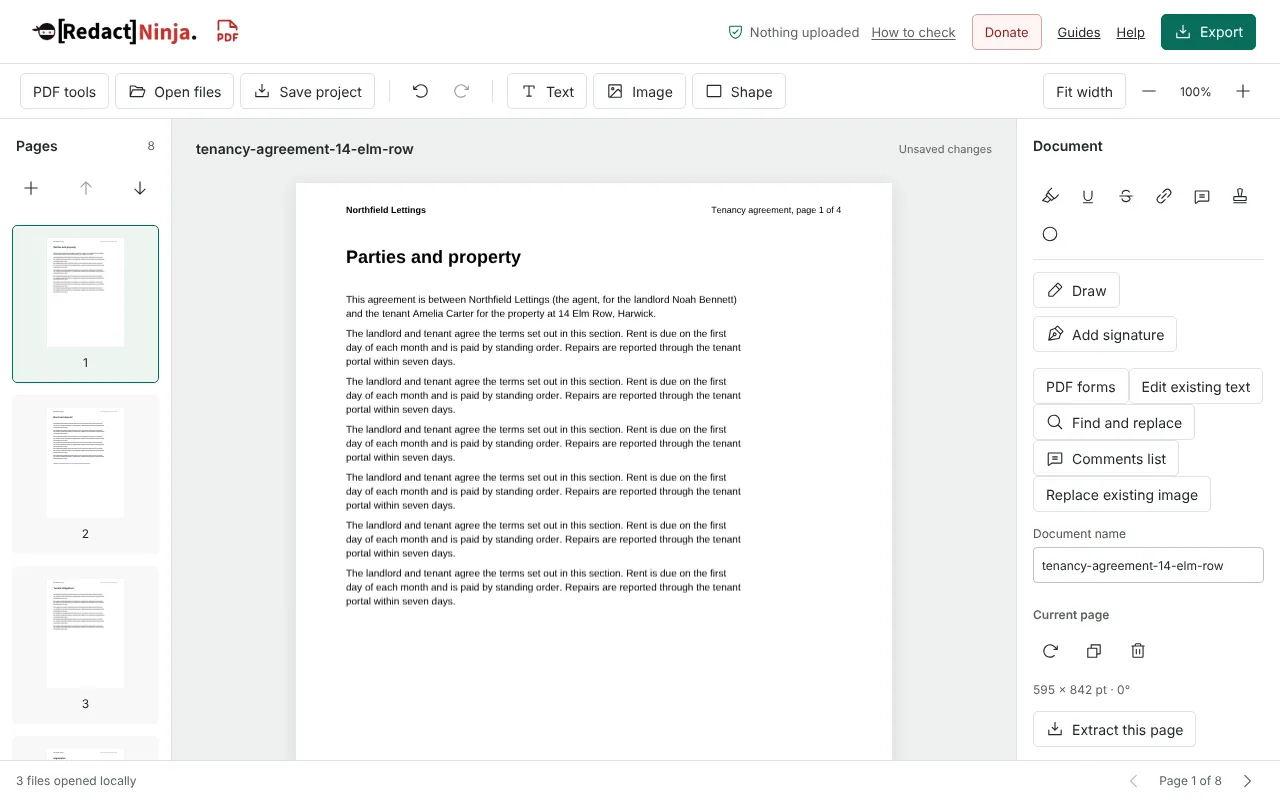
Worked example: merging a tenancy pack with a meter photo
In this test we merged three fictional files for a letting agent, Northfield Lettings: a 4-page tenancy agreement (5,394 bytes) with four bookmarks and a web link, a 3-page check-in inventory (4,255 bytes) with three bookmarks, and a 1600 x 1200 pixel JPG photo of an electricity meter (627,824 bytes). We selected all three files at once on this page, checked the page list in the editor and exported with the default settings.
The merged PDF had 8 pages, in the order the files were chosen. All 7 bookmarks from the two PDFs were kept, and the web link on page 2 was kept. The photo became a page of 1200 x 900 points, sized from its pixels rather than fitted to A4, and was stored as the original JPG. The download was 633,989 bytes, slightly less than the 637,473 bytes of the three sources.
What happens to bookmarks, links and document details when you merge
Bookmarks from each PDF are added to the combined file one after another, so readers can still jump to every section. Web links on the pages are kept. To rename, reorder or remove bookmarks before exporting, use the Bookmarks button in the editor.
Document details are not copied from the source files. The merged PDF takes its title from the Document name field, which starts as the name of the first file you opened, and the download uses the same name. The author and other properties of the originals are left out. Change the Document name first if the first file name does not describe the whole pack.
Merging photos and scans: page size and file size
A JPG or PNG becomes one page the size of the image at 96 pixels per inch, so a large phone photo makes a large page beside your A4 pages. If you want photos placed on A4 or Letter pages with margins, convert them with JPG to PDF first, then merge that PDF with the others. Each image must be under 10 MiB, and all the files together under 100 MiB.
JPG photos are added as they are, without being compressed again, so they add about their own file size. PNG images are stored losslessly, which keeps screenshots sharp but makes a PNG photo large. If the merged file is too big, run Compress PDF on it: it reduces large photos, including photos stored losslessly.
For double-sided paper scanned as two files, one of fronts and one of backs, open both and use Alternate pages in the editor. It interleaves the two groups, and can reverse the second group or turn it 180 degrees if the backs were fed in reverse order or upside down.
PDFs that cannot be merged as they are
Fillable forms: the editor opens a PDF with form fields, but combining its pages with other documents is blocked so that the form is not broken. Flatten the form first, then merge the flattened copy.
Signed PDFs: a PDF with a digital signature opens for viewing, but export is blocked, because any change would invalidate the signature. Send the signed original as a separate file.
Password-protected PDFs: you are asked for the password when the file opens. Before downloading, the export settings ask you to set a new password or to confirm that the merged copy will have no password.
After any merge, open the download and check the page count, the pages either side of each join and the bookmarks.
Good to know
- Pages from every file appear in one list, so you can mix pages from different documents.
- Bookmarks and web links from each PDF are kept. A PDF with fillable form fields must be flattened before its pages can be combined with other files.
- Signed PDFs can be opened but not exported, because any change would invalidate the signature. Send signed originals as separate files.
Why your files stay on your device
RedactNinja PDF runs in your web browser. When you choose a file, it is read and processed on your own computer, tablet or phone. It is not uploaded to a server, so there is nothing for us to store, read or delete afterwards.
You can check this yourself: open your browser's developer tools, select the Network tab and use a tool. Your document does not appear in the requests. The editor also loads no advertising or analytics code. How to check that nothing is uploaded.
Free, with no sign-up and no watermark
Every tool is free to use without an account. Nothing is added to your documents, and there are no daily task limits. Large files depend on your device's memory, so very big scans may take longer on older machines.
Questions about Merge PDF
How many files can I merge?
As many as your browser can handle, up to 100 MiB of files in total (each image under 10 MiB) and 500 pages in one document. Very large scans need more memory.
Can I merge images with PDFs?
Yes. JPG and PNG images are added as pages alongside your PDF pages.
Will the merged PDF be bigger than the originals?
Usually it is close to the combined size of the files. JPG photos are added as they are, without being compressed again. PNG images are stored losslessly, so a PNG photo can add a lot; Compress PDF can reduce it afterwards.
Are my files uploaded?
No. The tool runs in your browser and processes the file on your device. Nothing is sent to a server.
Is it free?
Yes. There is no account, no watermark and no daily limit.
Further reading
Related tools
All PDF tools
Organise
- Merge PDF
- Split PDF
- Organise PDF
- Rotate PDF
- Delete PDF pages
- Extract PDF pages
- Crop PDF
- Resize PDF pages
- Batch PDF
Convert from PDF
- PDF to Word
- PDF to Excel
- PDF to PowerPoint
- PDF to JPG
- PDF to PNG
- PDF to text
- PDF to Markdown
- Extract images
- PDF to PDF/A
Convert to PDF
Edit and sign
- Edit PDF
- Edit PDF text
- Find and replace in PDF
- PDF comments list
- Fill PDF form
- Sign PDF
- Draw on PDF
- Watermark PDF
- Add page numbers
- Bates numbering