How to resize PDF pages
- Select or drop the PDF.
- Open Resize pages and choose the target size and how content should fit.
- Apply the change to the pages you choose and export.
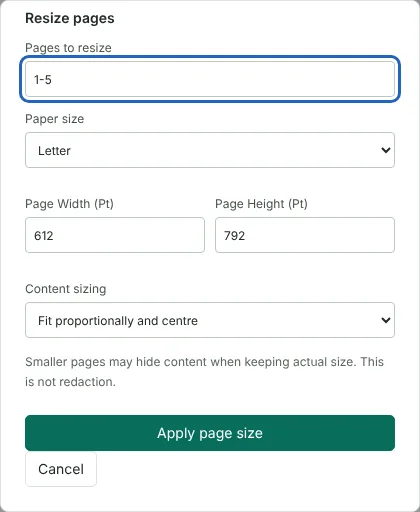
Worked example: making a mixed-size catalogue print on Letter paper
In this test we used a fictional 5-page catalogue from Bennett Supplies, 4,142 bytes in size, that mixed US Letter, US Legal, A5 and A4 pages. Pages to resize started at 1, the page on screen, so we entered 1-5, chose Letter as the paper size (612 by 792 points) and kept Fit proportionally and centre.
The downloaded PDF had 5 pages, all 612 by 792 points, and was 7,110 bytes. We measured the scale by comparing the same heading in the original and resized files. The two Letter pages were unchanged. The Legal page content was scaled to about 79%, with blank space added at the sides. The A4 page was scaled to about 94%. The smaller A5 page was enlarged to about 133%, so its text became larger. The text stayed selectable on every page.
Fit proportionally or keep actual size
Fit proportionally and centre scales each page up or down until it fits the new paper size without stretching, then centres it. Pages with a different shape gain blank space on two sides, as the Legal page did in the example. Smaller pages are enlarged as well as larger pages reduced, so if you only want to shrink oversized pages, enter just those pages in Pages to resize. That field starts with the page on screen, so enter a range such as 1-20 to change a whole document.
Keep actual size and centre places the content on the new page at 100% and centres it. On a larger page this adds a border. On a smaller page the edges are cut off from view, but, as with Crop PDF, the hidden content stays in the file. It is not redaction.
Custom page sizes and landscape pages
Choose Custom, or type a width and height, to use any size from 36 to 14,400 points. There are 72 points in an inch, so 8 by 10 inches is 576 by 720 points.
The width and height apply to the page as you see it. A landscape page resized to Letter becomes a portrait page, with its content scaled down to fit the narrower width. To keep landscape pages landscape, resize them separately and swap the width and height.
Text, images and drawings are scaled, not turned into pictures, so text stays selectable and sharp. Links, comments and other annotations are moved and scaled with the content so they stay over the right place. Any trim, bleed and art boxes that printers sometimes use are removed from the resized pages. If a comment or link lies partly outside an earlier crop, resizing stops with a message instead of moving it, so move or delete that annotation first.
Checking a resized PDF before printing
Open the downloaded file and look at the pages that changed shape the most, because scaled text can become small. In the example, the Legal page text was reduced to about 79% of its original size. With Keep actual size, check that nothing important sits close to the edges. When you print, choose actual size or 100% in the print dialogue, so the printer does not scale the pages a second time. The editor side panel shows the size of the current page in points under Current page, which helps you spot pages that still need resizing. To reduce the file size rather than the paper size, use Compress PDF.
Good to know
- Useful when a document mixes page sizes and needs to print consistently.
- Content is scaled to fit, so very different shapes may gain margins.
- To reduce file size rather than page size, use Compress PDF.
Why your files stay on your device
RedactNinja PDF runs in your web browser. When you choose a file, it is read and processed on your own computer, tablet or phone. It is not uploaded to a server, so there is nothing for us to store, read or delete afterwards.
You can check this yourself: open your browser's developer tools, select the Network tab and use a tool. Your document does not appear in the requests. The editor also loads no advertising or analytics code. How to check that nothing is uploaded.
Free, with no sign-up and no watermark
Every tool is free to use without an account. Nothing is added to your documents, and there are no daily task limits. Large files depend on your device's memory, so very big scans may take longer on older machines.
Questions about Resize PDF pages
How do I convert Letter to A4?
Choose A4 as the target size and resize all pages.
Will the text get smaller?
It is scaled to fit the new page. Moving from A4 to a smaller size reduces it.
Is this the same as compressing?
No. Resizing changes paper dimensions; Compress PDF reduces the file size.
Are my files uploaded?
No. The tool runs in your browser and processes the file on your device. Nothing is sent to a server.
Is it free?
Yes. There is no account, no watermark and no daily limit.
Related tools
All PDF tools
Organise
- Merge PDF
- Split PDF
- Organise PDF
- Rotate PDF
- Delete PDF pages
- Extract PDF pages
- Crop PDF
- Resize PDF pages
- Batch PDF
Convert from PDF
- PDF to Word
- PDF to Excel
- PDF to PowerPoint
- PDF to JPG
- PDF to PNG
- PDF to text
- PDF to Markdown
- Extract images
- PDF to PDF/A
Convert to PDF
Edit and sign
- Edit PDF
- Edit PDF text
- Find and replace in PDF
- PDF comments list
- Fill PDF form
- Sign PDF
- Draw on PDF
- Watermark PDF
- Add page numbers
- Bates numbering