How to sign a PDF
- Select or drop the PDF.
- Draw your signature or upload a picture of it.
- Place, resize and move it, then export the signed PDF.
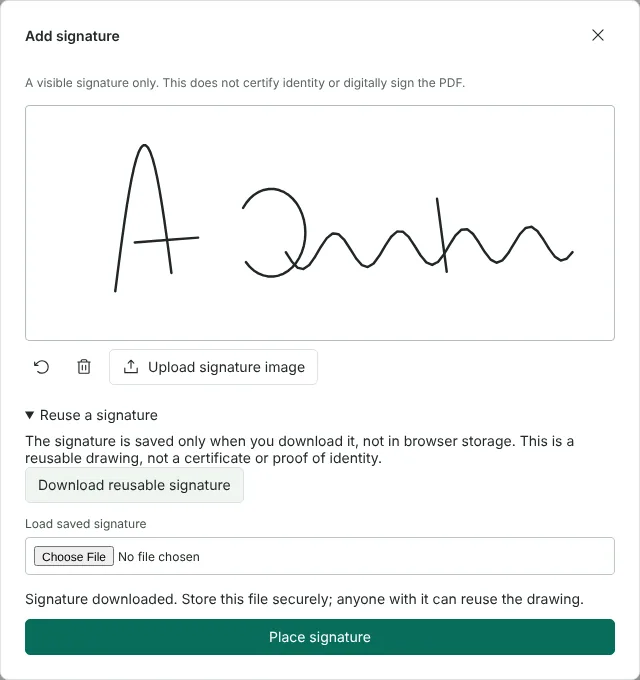
Worked example: signing a tenancy renewal form
In this test we used a fictional two-page renewal letter from Northfield Lettings (32,816 bytes). Page 2 ends with lines for the tenant's signature, printed name and date. We went to page 2, chose Add signature and drew an invented signature for Amelia Carter on the pad with the mouse: 5 strokes and 221 points.
Before placing it we used Reuse a signature > Download reusable signature, which saved redactninja-visible-signature.json, a 10,381-byte file holding only the drawing. The signature arrived 240 points wide at the top left of the page. We set it to 130 x 42 points with the position boxes, moved it onto the signature line, then added the printed name and the date as text boxes.
The exported PDF had 2 pages and was 58,861 bytes. It contained no images and no annotations: the drawn signature was saved as vector lines in the page itself, and the name and date could be selected as text.
Drawn signature or uploaded signature image?
A drawn signature is saved as lines in the page, so it stays sharp at any zoom level. Upload signature image places a PNG or JPEG of your signature instead, for example a scan. In this test, a PNG with a transparent background was embedded with its transparency mask, so the page shows through around the strokes. A JPEG has no transparency, so its background is always visible.
Both are visible marks. They show where you signed, but they do not prove who added them, and the drawing pad says that it does not certify identity or digitally sign the PDF. If a recipient asks for a digital signature, use Sign PDF with a certificate.
How to place and resize a signature on a PDF
The signature is added to the page you are viewing, so go to the right page before you choose Add signature. Drag it into place, or type exact x, y, width and height values in points in the properties panel, where y is measured from the top of the page. You can also change the stroke width, from 0.5 to 20 points, and the colour of a drawn signature.
Each drawing can hold up to 8,192 points, so a very long signature may reach the limit; Undo stroke and Clear drawing let you start again. For initials on several pages, draw them once, download the reusable file, then load it with Load saved signature and choose Use saved signature each time.
Keep your saved signature private, and sign in the right order
The reusable signature file is never kept in your browser. It exists only if you download it, and anyone with the file can place the same drawing, so store it as carefully as a scan of your signature.
If you also need a certificate signature, add the visible signature first, export the PDF, then sign the exported file with Sign PDF with a certificate. In this test that order worked: the exported letter with its drawn signature was certificate-signed afterwards. The other order does not work, because the editor will not export a PDF that already has a digital signature.
Good to know
- This adds a visible signature mark to the page: a drawn signature is saved as lines, and an uploaded picture as an image.
- Some organisations require a certificate-based digital signature instead. See Sign PDF with a certificate.
- Download your signature as a small file and load it next time to reuse it.
Why your files stay on your device
RedactNinja PDF runs in your web browser. When you choose a file, it is read and processed on your own computer, tablet or phone. It is not uploaded to a server, so there is nothing for us to store, read or delete afterwards.
You can check this yourself: open your browser's developer tools, select the Network tab and use a tool. Your document does not appear in the requests. The editor also loads no advertising or analytics code. How to check that nothing is uploaded.
Free, with no sign-up and no watermark
Every tool is free to use without an account. Nothing is added to your documents, and there are no daily task limits. Large files depend on your device's memory, so very big scans may take longer on older machines.
Questions about Sign PDF
Is a drawn signature legally valid?
That depends on the document and the person receiving it, and some documents have specific signing requirements. Check with the recipient if you are unsure.
Is my signature stored online?
No. It is only kept if you download it as a file on your own device.
Can I add initials and dates?
Yes. Draw initials as a second signature and add the date as text.
Are my files uploaded?
No. The tool runs in your browser and processes the file on your device. Nothing is sent to a server.
Is it free?
Yes. There is no account, no watermark and no daily limit.
Further reading
Related tools
All PDF tools
Organise
- Merge PDF
- Split PDF
- Organise PDF
- Rotate PDF
- Delete PDF pages
- Extract PDF pages
- Crop PDF
- Resize PDF pages
- Batch PDF
Convert from PDF
- PDF to Word
- PDF to Excel
- PDF to PowerPoint
- PDF to JPG
- PDF to PNG
- PDF to text
- PDF to Markdown
- Extract images
- PDF to PDF/A
Convert to PDF
Edit and sign
- Edit PDF
- Edit PDF text
- Find and replace in PDF
- PDF comments list
- Fill PDF form
- Sign PDF
- Draw on PDF
- Watermark PDF
- Add page numbers
- Bates numbering