How to convert PNG to PDF
- Select or drop your PNG images. JPG images can be added too.
- Choose the paper size, orientation and margins, or match each image.
- Create the PDF and download it.
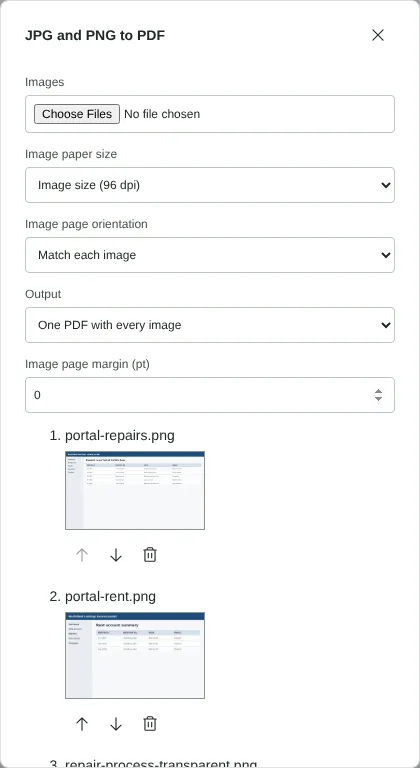
Worked example: tenant portal screenshots and a transparent diagram
In this test we converted three fictional PNG files from a letting agent's tenant portal: a 1920 x 1080 screenshot of a repairs list, a 1280 x 800 screenshot of a rent account, and a 1600 x 900 process diagram with a transparent background. The three files came to 118 KB.
We set the paper size to Image size (96 dpi) and the margin to 0, so each page matches its image exactly. The download, converted-images.pdf, had 3 pages measuring 1440 x 810, 960 x 600 and 1200 x 675 points, which is 0.75 points per pixel. It was 120 KB, almost the same as the PNG files. Every image kept its full pixel size, and the diagram's transparency was stored with it as a soft mask, so it showed on a plain white page with no grey or black box around it.
Image size or A4: choosing a page size for screenshots
Image size (96 dpi) gives every page the exact shape of its screenshot with no white border. That is best for reading on screen and for attaching to a support ticket or bug report. Because pages are sized at 96 pixels per inch, a 1920 x 1080 screenshot becomes a 20 x 11.25 inch page, larger than A4. That is fine on screen, but it will be scaled down if you print it.
Choose A4 or Letter when the PDF will be printed or added to a report. Each screenshot is scaled to fit inside the margin and centred, keeping its proportions. Match each image uses landscape pages for wide screenshots and portrait pages for tall ones, such as phone screenshots, so a mixed set still fills each page well. Interface text that is easy to read at full size can become small once a wide screenshot is shrunk onto a portrait page, so zoom in on the PDF to check it.
What happens to transparency, colours and file size
PNG is lossless and the PDF keeps it that way: the pixels are stored with lossless compression, so the edges of text, lines and icons stay as crisp as in the original. Transparent areas stay transparent, so the white page shows through. A logo or diagram drawn in white on a transparent background will therefore disappear against the page; give it a coloured background in your image editor first.
Screenshots compress well, which is why our three images made a PDF of about the same size. A PNG photo is different: it is large as a PNG and stays large in the PDF. For photos, save them as JPG and use JPG to PDF, which places JPG files in the PDF as they are. Compress PDF can also reduce large photos stored losslessly; in our test it left these three screenshots unchanged, because storing them as JPEG would not have saved enough to be worth blurring their text.
Limits and making screenshot text searchable
You can combine up to 50 images in one PDF, up to 100 MiB in total, and each image can have up to 16 million pixels. A very tall scrolling screenshot may also be too long for an Image size page: if you see a message about the supported PDF dimensions, switch to A4 or Letter and the image is scaled to fit.
Text in a screenshot is part of the picture, so you cannot search or copy it in the PDF. Run OCR PDF on the result to add a selectable text layer, then check names, amounts and reference numbers, as recognition can make mistakes.
Good to know
- PNG keeps sharp edges, so screenshots and diagrams stay crisp in the PDF.
- Transparent areas appear white on the PDF page.
- Text in the image is not selectable until you run OCR PDF.
Why your files stay on your device
RedactNinja PDF runs in your web browser. When you choose a file, it is read and processed on your own computer, tablet or phone. It is not uploaded to a server, so there is nothing for us to store, read or delete afterwards.
You can check this yourself: open your browser's developer tools, select the Network tab and use a tool. Your document does not appear in the requests. The editor also loads no advertising or analytics code. How to check that nothing is uploaded.
Free, with no sign-up and no watermark
Every tool is free to use without an account. Nothing is added to your documents, and there are no daily task limits. Large files depend on your device's memory, so very big scans may take longer on older machines.
Questions about PNG to PDF
Can I combine screenshots into one PDF?
Yes. Select them together; each becomes a page in the order shown.
Why is my PDF large?
PNG images are stored losslessly, so large PNG photos make large PDFs. Run Compress PDF on the result, or save photos as JPG before converting.
Can I convert the PDF back to PNG?
Yes, with PDF to PNG.
Are my files uploaded?
No. The tool runs in your browser and processes the file on your device. Nothing is sent to a server.
Is it free?
Yes. There is no account, no watermark and no daily limit.
Further reading
Related tools
All PDF tools
Organise
- Merge PDF
- Split PDF
- Organise PDF
- Rotate PDF
- Delete PDF pages
- Extract PDF pages
- Crop PDF
- Resize PDF pages
- Batch PDF
Convert from PDF
- PDF to Word
- PDF to Excel
- PDF to PowerPoint
- PDF to JPG
- PDF to PNG
- PDF to text
- PDF to Markdown
- Extract images
- PDF to PDF/A
Convert to PDF
Edit and sign
- Edit PDF
- Edit PDF text
- Find and replace in PDF
- PDF comments list
- Fill PDF form
- Sign PDF
- Draw on PDF
- Watermark PDF
- Add page numbers
- Bates numbering