How to crop PDF pages
- Select or drop the PDF.
- Set the crop in the Crop pages dialog, which opens with the file, and preview it.
- Apply it to the pages you choose and export.
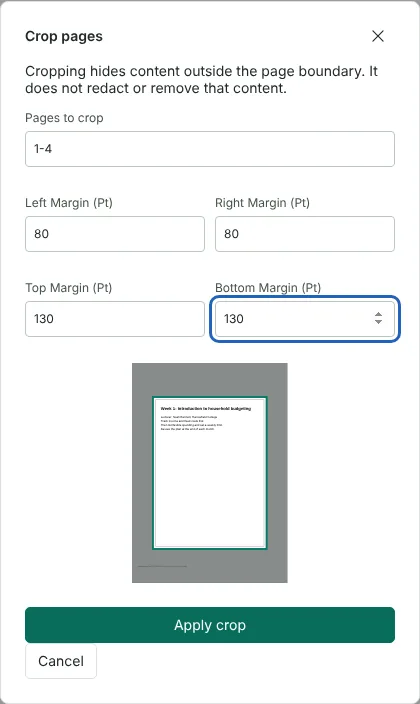
Worked example: trimming wide margins from a 4-page handout
In this test we used a fictional 4-page A4 handout from Harrowfield College, 4,340 bytes in size. Each page had wide white margins and a small staff-only print reference near the bottom left edge. When the file opened from this page, Pages to crop was set to 1, the page on screen, so we changed it to 1-4.
We set the left and right margins to 80 points and the top and bottom margins to 130 points, and the preview shaded the area that would be hidden. After Apply crop and Export, the downloaded PDF had 4 pages, each showing 435 by 582 points (about 154 by 205 mm) instead of 595 by 842.
The crop hid the print reference but did not remove it. The full A4 page area was still in the file, and a text extraction tool still read the reference on all 4 pages.
What happens to content outside the crop
A PDF page has a full drawing area and a visible window onto it, called the crop box. Crop pages changes only that window. The full page area and everything drawn on it stay in the file, so viewers show the cropped area while the hidden text, images and drawings are still there. Anyone with a PDF editor can reset the crop box, and some text extraction tools still read the hidden text, as the example shows. Do not rely on a viewer or search failing to find it.
Because nothing is deleted, cropping does not lower the quality of what remains, and you can undo a crop in the editor before you export. It also means cropping is not a way to remove information. If a margin holds anything that must not be shared, such as names, reference numbers or reviewer notes, remove it permanently with Redact PDF, then crop the redacted copy if you still want tidier margins.
Choosing crop margins in points
Margins are entered in points, the unit PDFs use for page size. There are 72 points in an inch and about 2.83 points in a millimetre, so trimming 10 mm takes about 28 points. A4 is 595 by 842 points and US Letter is 612 by 792. The editor side panel shows the size of the current page under Current page.
Each margin is measured from that edge of the page as you see it, so rotated pages are trimmed on the edges you see on screen. The crop must leave at least 2 points of width and height. The same margins apply to every page in Pages to crop, so for a document that mixes page sizes or layouts, crop each group of pages with its own range.
Crop or resize a PDF page?
Crop when you want to cut away blank or unwanted edges and you are happy for the page to become a smaller, non-standard size, for example for reading on a tablet. Use Resize PDF pages when every page must have a fixed paper size for printing; it scales the whole page onto the new size instead of hiding parts of it. You can crop first and resize afterwards.
If pages have different margins, for example a scan where odd and even pages sit differently, run Crop pages more than once with a different range each time, such as 1, 3, 5 and then 2, 4, 6. Each crop is a separate step, so Undo in the editor reverses the last one if the preview was not quite right. When the pages look right, export once.
Good to know
- Cropping changes the visible area of the page.
- Content outside the crop can still exist in the file. Cropping is not redaction.
- Use Resize PDF pages to change the paper size instead.
Why your files stay on your device
RedactNinja PDF runs in your web browser. When you choose a file, it is read and processed on your own computer, tablet or phone. It is not uploaded to a server, so there is nothing for us to store, read or delete afterwards.
You can check this yourself: open your browser's developer tools, select the Network tab and use a tool. Your document does not appear in the requests. The editor also loads no advertising or analytics code. How to check that nothing is uploaded.
Free, with no sign-up and no watermark
Every tool is free to use without an account. Nothing is added to your documents, and there are no daily task limits. Large files depend on your device's memory, so very big scans may take longer on older machines.
Questions about Crop PDF
Does cropping remove the hidden content?
No. Use Redact PDF to remove information.
Can I crop all pages the same way?
Yes. The crop applies to the current page unless you enter a range, such as 1-12, to apply it to every page.
Will cropping reduce quality?
No. The content is not resampled.
Are my files uploaded?
No. The tool runs in your browser and processes the file on your device. Nothing is sent to a server.
Is it free?
Yes. There is no account, no watermark and no daily limit.
Related tools
All PDF tools
Organise
- Merge PDF
- Split PDF
- Organise PDF
- Rotate PDF
- Delete PDF pages
- Extract PDF pages
- Crop PDF
- Resize PDF pages
- Batch PDF
Convert from PDF
- PDF to Word
- PDF to Excel
- PDF to PowerPoint
- PDF to JPG
- PDF to PNG
- PDF to text
- PDF to Markdown
- Extract images
- PDF to PDF/A
Convert to PDF
Edit and sign
- Edit PDF
- Edit PDF text
- Find and replace in PDF
- PDF comments list
- Fill PDF form
- Sign PDF
- Draw on PDF
- Watermark PDF
- Add page numbers
- Bates numbering