How to convert a PDF to greyscale
- Select or drop the colour PDF.
- Leave the method on Keep text selectable, or choose Image only. Pick an image quality for any pages converted as images.
- Select Convert to greyscale. The new PDF downloads when every page is done and checked.
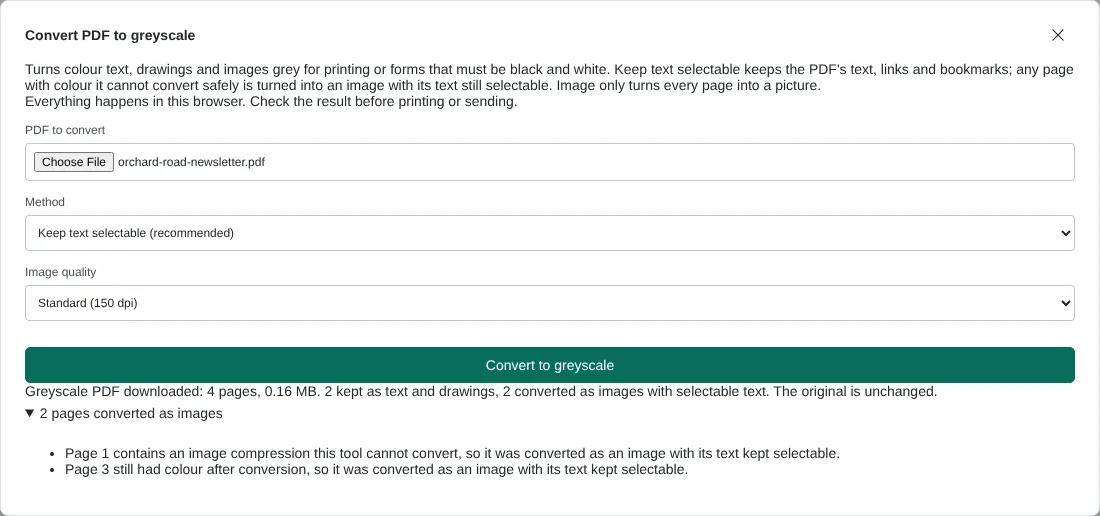
Worked example: a colour residents newsletter in greyscale
In this test we converted a fictional 4-page A4 newsletter for the Orchard Road residents group, 34,164 bytes in size. It had a blue banner, red and green text, a coloured bar chart, a colour illustration on pages 1 and 3, and a web link on each page. We used Keep text selectable with Standard (150 dpi) quality.
The greyscale PDF had 4 pages and was 169,268 bytes. Pages 2 and 4 were kept as text and drawings. Pages 1 and 3 were converted as 150 dpi images with their text kept selectable, and the dialog gave a reason for each: page 1 used an image compression the tool cannot convert, and page 3 still had colour after conversion. When we rendered the result we found no coloured pixels on any page, text could be extracted from all 4 pages, and all 4 links were kept.
With Image only, the same newsletter gave 301,151 bytes at Standard quality and 158,352 bytes with Smaller file (96 dpi).
Why some pages are converted as images
Keep text selectable changes the colours inside the PDF itself. A few things cannot be changed safely this way, such as spot colours and some image compression types. Every page is also drawn and checked after conversion, and any page that still shows colour is rebuilt as a grey picture with an invisible copy of its text, so search and copy still work. The dialog lists these pages and the reason for each.
On a page rebuilt as a picture, links still work, but other markup such as comments and highlights becomes part of the picture. Picture pages also add to the file size, which is why the example grew from 34,164 to 169,268 bytes. If size matters, choose Smaller file (96 dpi), or run Compress PDF afterwards.
Choosing the image quality for greyscale pages
Image quality only affects pages that become pictures: every page with Image only, and any fallback pages with Keep text selectable. Smaller file uses 96 dpi, Standard uses 150 dpi and High quality for printing uses 300 dpi. In the example, a full A4 page at 150 dpi was 1,241 by 1,754 pixels. Choose 300 dpi for small print or fine lines that will be printed. For reading on screen or uploading to a portal, 96 or 150 dpi is often enough.
Before you print or submit the greyscale copy
Check photos and charts on screen. Colours that look very different, such as red and green, can turn into similar greys, so a chart that relies on colour alone may become hard to read. If you can, add labels in the original document and convert again.
The tool needs to read the file, so a password-protected PDF must be unlocked first with Unlock PDF. It accepts PDFs of up to 100 MiB and 500 pages. The download is a new file with -greyscale added to its name, and your original is not changed.
Good to know
- Keep text selectable changes colour text, shapes, gradients and photos to grey and keeps the text, links and bookmarks.
- Every page is checked after conversion. A page with colour that cannot be changed safely, such as a spot colour, is turned into a grey image with its text still selectable underneath.
- Image only turns every page into a picture, which can make the file larger.
- The original file is not changed.
Why your files stay on your device
RedactNinja PDF runs in your web browser. When you choose a file, it is read and processed on your own computer, tablet or phone. It is not uploaded to a server, so there is nothing for us to store, read or delete afterwards.
You can check this yourself: open your browser's developer tools, select the Network tab and use a tool. Your document does not appear in the requests. The editor also loads no advertising or analytics code. How to check that nothing is uploaded.
Free, with no sign-up and no watermark
Every tool is free to use without an account. Nothing is added to your documents, and there are no daily task limits. Large files depend on your device's memory, so very big scans may take longer on older machines.
Questions about PDF to greyscale
Is greyscale the same as black and white?
Greyscale keeps shades of grey, so photos and charts stay readable. Pure black and white uses only two tones. Most printers and portals that ask for black and white accept greyscale.
Can I still select and search the text?
Yes. With Keep text selectable the original text stays as text. Pages that had to become images keep an invisible copy of their text, so search and copy still work.
Will the file be smaller?
Not necessarily. With Keep text selectable it can stay about the same, but pages that have to become images make it larger. Image only can make text-heavy PDFs larger; choose a smaller image quality if size matters.
Is a scanned PDF searchable afterwards?
Only if it was before. A scan is a picture of text, so run OCR PDF first or afterwards.
Are my files uploaded?
No. The tool runs in your browser and processes the file on your device. Nothing is sent to a server.
Is it free?
Yes. There is no account, no watermark and no daily limit.
Related tools
All PDF tools
Organise
- Merge PDF
- Split PDF
- Organise PDF
- Rotate PDF
- Delete PDF pages
- Extract PDF pages
- Crop PDF
- Resize PDF pages
- Batch PDF
Convert from PDF
- PDF to Word
- PDF to Excel
- PDF to PowerPoint
- PDF to JPG
- PDF to PNG
- PDF to text
- PDF to Markdown
- Extract images
- PDF to PDF/A
Convert to PDF
Edit and sign
- Edit PDF
- Edit PDF text
- Find and replace in PDF
- PDF comments list
- Fill PDF form
- Sign PDF
- Draw on PDF
- Watermark PDF
- Add page numbers
- Bates numbering