How to convert HTML to PDF
- Select or drop the HTML file. Add the image folder if the page refers to local images.
- Preview the converted PDF.
- Download the PDF.
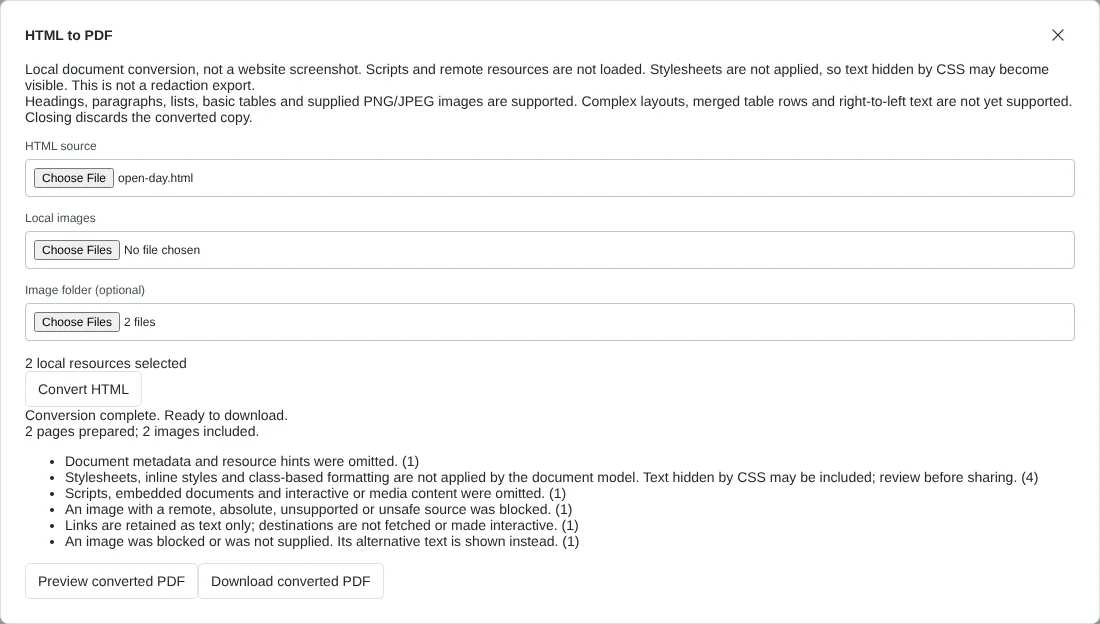
Worked example: an open day page with local images
In this test we converted a fictional 1,478-byte HTML page for an Orchard Row open day. It has two levels of heading, a numbered list, a three-row table, two local images in an images folder (a PNG of 800 by 450 pixels and a JPEG of 640 by 360), one image on a website, a link, a script and a stylesheet. The stylesheet sets a Georgia font and colours, and hides an internal note with display: none.
We selected the images folder under Image folder, and the dialog showed 2 local resources. The PDF had 2 A4 pages, 2 images and was 46,347 bytes. The tool listed six warnings, including stylesheets not applied, a script omitted, a remote image blocked and a link kept as text. The website image was replaced by [Image not included] and its alternative text. The text used Liberation Sans with no colours, and the internal note hidden by the stylesheet appeared in the PDF.
When we chose the two images under Local images instead, or selected the folder above images, the PDF had 1 page and 0 images, because the file paths did not match the page.
Getting local images into the PDF
An image is only included when its path in the HTML matches the path of a file you selected. With Local images, each file is known by its name alone, so it matches src="garden.png". With Image folder, each file is known by the folder name plus its name, so selecting a folder called images matches src="images/garden.png". Pick the option that matches how your page writes its paths. After converting, compare the images included count in the dialog with the number of pictures on your page.
Images written into the HTML as PNG or JPEG data URIs are included without selecting anything. Web addresses, paths that start with a slash and other unsafe paths are blocked, and the alternative text is printed instead. Only PNG and JPEG work: convert GIF, WebP or SVG images to PNG first. You can add up to 100 images, each up to 8 MiB and 64 MiB in total.
Why the PDF looks plainer than the web page
The converter reads the structure of the HTML, not its design. Headings get fixed sizes, strong and em tags give bold and italic, lists are numbered or bulleted, and tables get equal-width columns with thin borders on A4 pages. Stylesheets, inline styles and classes are ignored, so fonts, colours, backgrounds and page layout from CSS are lost. Elements with the hidden attribute are left out, but text hidden only by CSS is printed, so read the PDF before you share it.
Links keep their text but are not clickable. Scripts, forms, video, frames and SVG drawings are left out. The file must be UTF-8 text of no more than 2 MB. Pages with right-to-left text, merged table rows, more than 20 table columns, or images or tables inside table cells are refused with a message, and no partial PDF is made. For a page that has to look exactly as it does in your browser, open it there and print it to PDF.
Good to know
- For privacy and safety, scripts are not run and online resources are not downloaded.
- Text and local images are converted. Page styles (CSS) are not applied, so fonts, colours and layout follow a plain default style, and content hidden by styles can appear.
- To save a live web page, use your browser's Print to PDF instead.
Why your files stay on your device
RedactNinja PDF runs in your web browser. When you choose a file, it is read and processed on your own computer, tablet or phone. It is not uploaded to a server, so there is nothing for us to store, read or delete afterwards.
You can check this yourself: open your browser's developer tools, select the Network tab and use a tool. Your document does not appear in the requests. The editor also loads no advertising or analytics code. How to check that nothing is uploaded.
Free, with no sign-up and no watermark
Every tool is free to use without an account. Nothing is added to your documents, and there are no daily task limits. Large files depend on your device's memory, so very big scans may take longer on older machines.
Questions about HTML to PDF
Can I paste a website address?
No. This tool converts HTML files you already have. Use your browser's print option for live pages.
Why are images missing?
Images on other websites are not fetched. Save them locally, add the image folder, and check that the paths in the HTML match the file names.
Will my styles be kept?
No. Styles are not applied, so the PDF uses a plain default layout. Check for content that was hidden on the web page.
Are my files uploaded?
No. The tool runs in your browser and processes the file on your device. Nothing is sent to a server.
Is it free?
Yes. There is no account, no watermark and no daily limit.
Related tools
All PDF tools
Organise
- Merge PDF
- Split PDF
- Organise PDF
- Rotate PDF
- Delete PDF pages
- Extract PDF pages
- Crop PDF
- Resize PDF pages
- Batch PDF
Convert from PDF
- PDF to Word
- PDF to Excel
- PDF to PowerPoint
- PDF to JPG
- PDF to PNG
- PDF to text
- PDF to Markdown
- Extract images
- PDF to PDF/A
Convert to PDF
Edit and sign
- Edit PDF
- Edit PDF text
- Find and replace in PDF
- PDF comments list
- Fill PDF form
- Sign PDF
- Draw on PDF
- Watermark PDF
- Add page numbers
- Bates numbering