How to organise PDF pages
- Select or drop one or more PDFs.
- Open Organise pages and select the pages to move earlier or later, rotate or remove.
- Apply the changes and export the reorganised PDF.
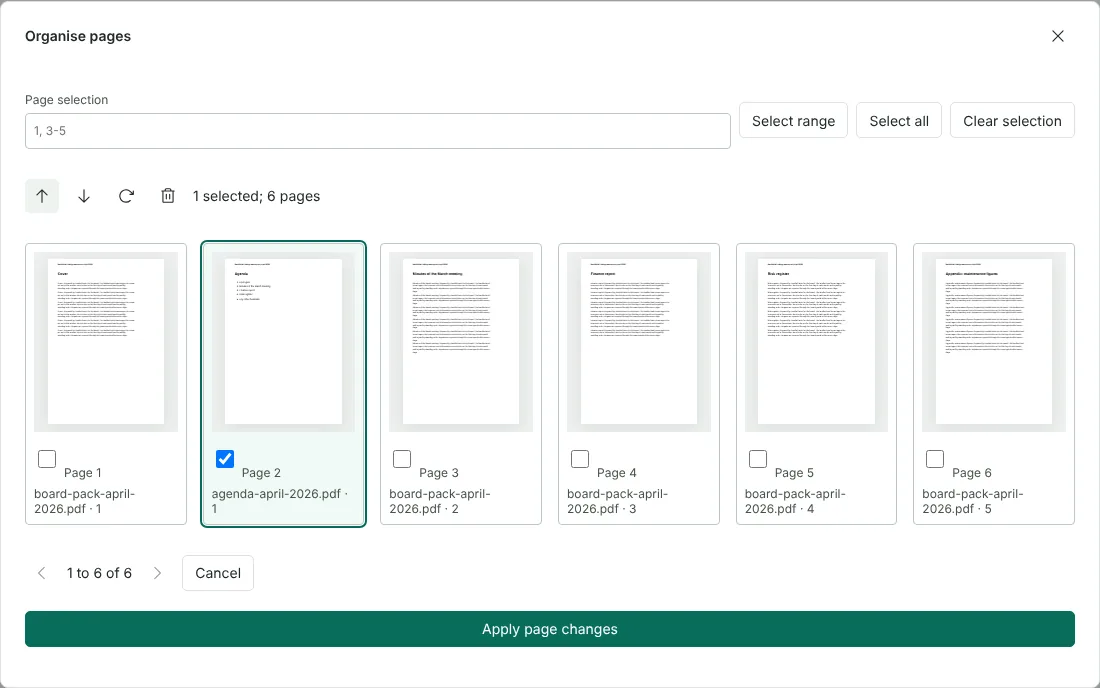
Worked example: putting a late agenda into a board pack
In this test we opened two fictional files from Northfield Lettings together: a 5-page board pack (5,508 bytes) and a 1-page agenda (1,734 bytes) that arrived later. In Organise pages the agenda appeared as page 6, labelled with its file name and original page number. We ticked page 6 and selected Move selected pages earlier four times, which placed it at page 2, straight after the cover. The other five thumbnails kept their labels, which made it easy to confirm that nothing else had moved.
After Apply page changes we exported the PDF. It had 6 pages, was 4,635 bytes and ran Cover, Agenda, Minutes of the March meeting, Finance report, Risk register, then the appendix. The download took its name from the first file opened, board-pack-april-2026.pdf.
Ways to reorder PDF pages
Tick one or more pages and use Move selected pages earlier or Move selected pages later to shift them one place per click. Ticked pages move together, so you can move a whole section at once. You can also drag a thumbnail and drop it on the page it should come before. If the page you drag is ticked, every ticked page moves with it.
Page selection works here too. Type a range such as 3-5, choose Select range, and the three pages move as a block with the arrow buttons. Select all and Clear selection help when you work on most of the document.
Each thumbnail shows the file it came from and its page number in that file, which helps when you combine documents. The organiser shows 12 thumbnails at a time; use the arrows at the bottom to see the rest. Changes are only made when you choose Apply page changes. Cancel discards them, and Undo in the editor reverses changes you have applied.
Add a blank page or copy a page while you organise
Insert blank page, the plus button at the top of the Pages panel, adds an A4 page at the end of the document. Open Organise pages and move it into place, for example as a divider, or so that a section starts on a right-hand page when the file is printed double-sided.
Duplicate page, under Current page in the editor's side panel, places a copy of the page you are viewing straight after it, together with any text or shapes you have added to it. You can then move the copy wherever it is needed.
Organise pages or another page tool?
Organise pages is the place to reorder, rotate and remove pages in one pass. Other tools are quicker for some jobs: Split PDF to break a document into several files, Extract PDF pages to save a range as a new PDF, and Alternate pages in the editor to interleave fronts and backs that were scanned as separate files.
Simple fillable forms can be reordered as long as every page of the form is kept once, but their pages cannot be rotated or removed here. If a form cannot be reordered safely, export stops with a message and nothing downloads. Signed PDFs cannot be exported after changes, because that would invalidate the signature.
Before sharing, page through the downloaded file and check the order, especially where pages from different files meet. To rename the download, change the Document name in the editor before you export.
Good to know
- Pages from several PDFs can be arranged together, which also merges them.
- Select a range to act on many pages at once.
- Blank pages can be inserted from the page panel.
Why your files stay on your device
RedactNinja PDF runs in your web browser. When you choose a file, it is read and processed on your own computer, tablet or phone. It is not uploaded to a server, so there is nothing for us to store, read or delete afterwards.
You can check this yourself: open your browser's developer tools, select the Network tab and use a tool. Your document does not appear in the requests. The editor also loads no advertising or analytics code. How to check that nothing is uploaded.
Free, with no sign-up and no watermark
Every tool is free to use without an account. Nothing is added to your documents, and there are no daily task limits. Large files depend on your device's memory, so very big scans may take longer on older machines.
Questions about Organise PDF
How do I reorder pages?
Select pages in the organiser and move them earlier or later, or use the arrows in the page list.
Can I add a blank page?
Yes, insert a blank page from the page panel.
Organize or organise?
Same tool. We use British spelling.
Are my files uploaded?
No. The tool runs in your browser and processes the file on your device. Nothing is sent to a server.
Is it free?
Yes. There is no account, no watermark and no daily limit.
Related tools
All PDF tools
Organise
- Merge PDF
- Split PDF
- Organise PDF
- Rotate PDF
- Delete PDF pages
- Extract PDF pages
- Crop PDF
- Resize PDF pages
- Batch PDF
Convert from PDF
- PDF to Word
- PDF to Excel
- PDF to PowerPoint
- PDF to JPG
- PDF to PNG
- PDF to text
- PDF to Markdown
- Extract images
- PDF to PDF/A
Convert to PDF
Edit and sign
- Edit PDF
- Edit PDF text
- Find and replace in PDF
- PDF comments list
- Fill PDF form
- Sign PDF
- Draw on PDF
- Watermark PDF
- Add page numbers
- Bates numbering