How to convert PDF to JPG
- Select or drop the PDF.
- In the export settings, choose JPG, the resolution (72 to 300 dpi) and the pages you want.
- Download the ZIP of JPG images and check that small text is readable.
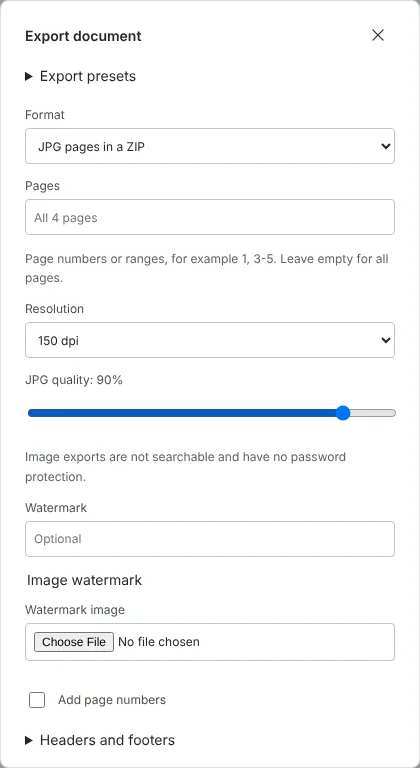
Worked example: a 4-page welcome pack as JPG images
In this test we exported a fictional 4-page tenant welcome pack from a letting agent. It is A4 and 6.1 MB, with a full-width room photo on pages 1 and 3 and text on pages 2 and 4.
With JPG pages in a ZIP, all pages, 150 dpi and the default JPG quality of 90%, the download was elm-row-welcome-pack.zip, named after the document, at 482 KB. It held four files, page-0001.jpg to page-0004.jpg, each 1241 x 1754 pixels. The images ranged from 65 KB for the shortest text page to 144 KB.
Exporting again at 75% quality cut the ZIP to 305 KB, and the photo pages from about 136 KB to 73 KB each. Lower quality saves space but adds blur and blocky patches around fine detail, so zoom in on a text page before you settle on a setting.
Choosing the resolution and JPG quality
The resolution sets the pixel size of each image. For an A4 page, 72 dpi gives 596 x 842 pixels, 96 dpi gives 794 x 1123, 150 dpi gives 1241 x 1754 and 300 dpi gives 2481 x 3508. Use 72 or 96 dpi for thumbnails and web previews, 150 dpi for slides and social posts where people may zoom in, and 300 dpi for printing. Each page can be up to 16 million pixels, so an A0 drawing can only be exported at 72 or 96 dpi.
JPG quality runs from 10% to 100% in steps of 5. The default of 90% suits most uses. The setting has the most effect on photo pages: in our test, 75% roughly halved them. In our test the JPG files did not record a dpi value, so if you print them, set the print size in the program you print from.
When to choose JPG and when PNG is better
JPG gives smaller files for pages that are mostly photographs, which is why it suits brochures, property particulars and slides with pictures. For pages of text, tables and line drawings, PNG keeps edges clean. In a separate test with a fictional heating guide made of diagrams and text, the three pages at 150 dpi came to 235 KB as JPG at 90% and 327 KB as PNG. The JPG of the flow chart page held 6,717 different colours against 720 in the PNG, because JPG compression adds faint speckles around lines and letters. If people will read the images closely, PDF to PNG is the safer choice.
If you want the original pictures inside a PDF rather than images of whole pages, use Extract images from PDF instead. It saves each embedded photo at its stored resolution.
Adding a watermark or page numbers to the images
JPG export goes through the same export settings as a PDF, so you can mark the images as they are made. Type a text watermark such as DRAFT or SAMPLE, or choose a watermark image, and tick Add page numbers to show each image's position in the document. In a test with the same export steps, a DRAFT watermark and page numbers both appeared on every exported image. This is useful when you post previews of a document that is not final, or send sample pages of a report.
The exported images have no password protection. If the PDF you opened was protected, the export asks you to confirm that you understand this before it creates the ZIP. Your original PDF is not changed.
Good to know
- Each page becomes one image. Use 150 dpi for screens and 300 dpi for print or fine detail.
- Images do not keep selectable text, links or form fields.
- To save pictures embedded in a PDF instead of whole pages, use Extract images from PDF.
Why your files stay on your device
RedactNinja PDF runs in your web browser. When you choose a file, it is read and processed on your own computer, tablet or phone. It is not uploaded to a server, so there is nothing for us to store, read or delete afterwards.
You can check this yourself: open your browser's developer tools, select the Network tab and use a tool. Your document does not appear in the requests. The editor also loads no advertising or analytics code. How to check that nothing is uploaded.
Free, with no sign-up and no watermark
Every tool is free to use without an account. Nothing is added to your documents, and there are no daily task limits. Large files depend on your device's memory, so very big scans may take longer on older machines.
Questions about PDF to JPG
Can I convert just one page?
Yes. Enter the page number in the page range.
JPG or PNG?
JPG makes smaller files for photos. PNG keeps text and diagrams sharper. See PDF to PNG.
Why is there a ZIP?
Images always download in a ZIP, even for one page, so several pages arrive as a single download.
Are my files uploaded?
No. The tool runs in your browser and processes the file on your device. Nothing is sent to a server.
Is it free?
Yes. There is no account, no watermark and no daily limit.
Related tools
All PDF tools
Organise
- Merge PDF
- Split PDF
- Organise PDF
- Rotate PDF
- Delete PDF pages
- Extract PDF pages
- Crop PDF
- Resize PDF pages
- Batch PDF
Convert from PDF
- PDF to Word
- PDF to Excel
- PDF to PowerPoint
- PDF to JPG
- PDF to PNG
- PDF to text
- PDF to Markdown
- Extract images
- PDF to PDF/A
Convert to PDF
Edit and sign
- Edit PDF
- Edit PDF text
- Find and replace in PDF
- PDF comments list
- Fill PDF form
- Sign PDF
- Draw on PDF
- Watermark PDF
- Add page numbers
- Bates numbering